
How to Select Features by Location in GeoPandas
Problem statement
A common GIS task is selecting features based on where they are relative to another layer.
Typical examples include:
- selecting points inside administrative boundaries
- selecting parcels within a study area
- selecting roads that intersect flood zones
- filtering buildings within a buffer distance of a river
In GeoPandas, this means comparing geometries in one GeoDataFrame to geometries in another and keeping only the matching features. The key requirements are:
- both layers must use the same CRS
- you must choose the correct spatial predicate, such as
within,intersects, orcontains
Quick answer
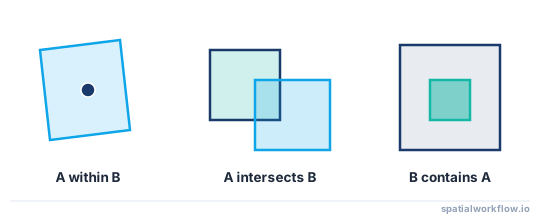
The usual GeoPandas workflow for selecting features by location is:
- read both layers
- make sure both use the same CRS
- choose the correct spatial predicate
- use
geopandas.sjoin()when matching one full layer to another
Example:
import geopandas as gpd

points = gpd.read_file("data/schools.shp")
polygons = gpd.read_file("data/city_boundary.shp")

polygons = polygons.to_crs(points.crs)

selected = gpd.sjoin(points, polygons, predicate="within", how="inner")
print(len(selected))
This keeps only points that fall inside the polygons.
Step-by-step solution
Load the layers you want to compare
Read source files into GeoDataFrames
Start by loading both datasets.
import geopandas as gpd

points = gpd.read_file("data/customer_locations.geojson")
boundaries = gpd.read_file("data/admin_areas.shp")
Check geometry types
It helps to confirm what kinds of features you are working with.
print(points.geom_type.unique())
print(boundaries.geom_type.unique())
Typical output might be:
- points layer:
Point - boundary layer:
PolygonorMultiPolygon
Check for invalid geometries
Invalid geometries can cause spatial operations to fail or return unexpected results.
print(points.is_valid.value_counts())
print(boundaries.is_valid.value_counts())
If needed, you can try a quick repair for some polygon issues:
# Quick fix for some invalid polygon geometries; verify results afterward
boundaries["geometry"] = boundaries.buffer(0)
Make sure both layers use the same CRS
Check the CRS of each layer
print(points.crs)
print(boundaries.crs)
Reproject one layer if needed
If the CRS does not match, reproject one layer to the other.
boundaries = boundaries.to_crs(points.crs)Why CRS mismatch causes wrong results
If one layer is in EPSG:4326 and the other is in a projected CRS such as EPSG:3857 or EPSG:32633, the coordinates are not directly comparable. Spatial selection may return no rows or incorrect rows.
Select features by spatial relationship
There are two main patterns:
- compare a layer to one merged geometry
- compare every feature in one layer to every feature in another with
sjoin()
Use the first pattern for simple filtering against a single area. Use sjoin() for feature-to-feature matching between full layers.
Use within to select features inside polygons
This is a common pattern for points or parcels inside an area.
import geopandas as gpd

points = gpd.read_file("data/inspection_points.shp")
polygons = gpd.read_file("data/service_areas.shp").to_crs(points.crs)

study_area = polygons.union_all()
selected_points = points[points.within(study_area)]

print(f"Selected points: {len(selected_points)}")
This works well when you want to test one layer against the combined geometry of another.
Use intersects to select overlapping or touching features
Use intersects when features should be kept if they overlap or touch.
import geopandas as gpd

roads = gpd.read_file("data/roads.shp")
flood_zones = gpd.read_file("data/flood_zones.shp").to_crs(roads.crs)

flood_geom = flood_zones.union_all()
roads_in_flood = roads[roads.intersects(flood_geom)]

print(f"Roads intersecting flood zones: {len(roads_in_flood)}")
Use contains when the reference geometry must fully contain another
contains is the reverse of within. For example, if you want polygons that contain a specific point:
import geopandas as gpd

points = gpd.read_file("data/sample_points.shp")
polygons = gpd.read_file("data/zones.shp").to_crs(points.crs)

point = points.iloc[0].geometry
matching_polygons = polygons[polygons.contains(point)]

print(matching_polygons)
Choose the right predicate
Use:
withinfor features completely inside another geometrycontainsfor geometries that completely contain anotherintersectsfor any overlap or touchtoucheswhen only shared boundaries mattercrossesfor line-crossing cases
For many GIS workflows, intersects is more inclusive than within.
Use spatial join for layer-to-layer selection
When geopandas.sjoin() is the simplest option
If you want to compare every feature in one layer against every feature in another and keep matching rows, sjoin() is usually the cleanest approach.
Select features from one layer based on matches in another
import geopandas as gpd

points = gpd.read_file("data/stores.shp")
districts = gpd.read_file("data/sales_districts.shp").to_crs(points.crs)

joined = gpd.sjoin(points, districts, how="inner", predicate="within")
print(joined.columns)
print(joined.head())
Keep only matching records from the target layer
how="inner" keeps only matches, which makes it useful for select-by-location tasks.
selected_points = joined.drop(columns=["index_right"], errors="ignore")Code examples
Select points within administrative boundaries
import geopandas as gpd

points = gpd.read_file("data/schools.geojson")
admin = gpd.read_file("data/municipal_boundary.shp").to_crs(points.crs)

selected = gpd.sjoin(points, admin, predicate="within", how="inner")
print(f"Schools inside boundary: {len(selected)}")
Select roads that intersect hazard polygons
import geopandas as gpd

roads = gpd.read_file("data/roads.shp")
hazards = gpd.read_file("data/landslide_zones.shp").to_crs(roads.crs)

selected_roads = gpd.sjoin(roads, hazards, predicate="intersects", how="inner")
selected_roads = selected_roads.drop(columns=["index_right"], errors="ignore")

print(f"Roads intersecting hazards: {len(selected_roads)}")
Select parcels inside a study area boundary
import geopandas as gpd

parcels = gpd.read_file("data/parcels.shp")
study_area = gpd.read_file("data/study_area.geojson").to_crs(parcels.crs)

study_geom = study_area.union_all()
selected_parcels = parcels[parcels.within(study_geom)]

print(f"Parcels inside study area: {len(selected_parcels)}")
Save the selected features
Export results to GeoJSON or Shapefile
After filtering, write the result to a new file.
import geopandas as gpd

parcels = gpd.read_file("data/parcels.shp")
study_area = gpd.read_file("data/study_area.geojson").to_crs(parcels.crs)

study_geom = study_area.union_all()
selected_parcels = parcels[parcels.within(study_geom)]

selected_parcels.to_file("output/selected_parcels.geojson", driver="GeoJSON")
selected_parcels.to_file("output/selected_parcels.shp")
Keep only the columns you need before saving
This reduces file size and avoids carrying unnecessary fields into the output.
import geopandas as gpd

parcels = gpd.read_file("data/parcels.shp")
study_area = gpd.read_file("data/study_area.geojson").to_crs(parcels.crs)

study_geom = study_area.union_all()
selected_parcels = parcels[parcels.within(study_geom)]

output = selected_parcels[["parcel_id", "owner_name", "geometry"]]
output.to_file("output/selected_parcels.geojson", driver="GeoJSON")
If you save to Shapefile, remember that field names are limited in length.
Explanation
There are two practical ways to select features by location in GeoPandas.
The first is to use boolean geometry methods such as within() and intersects() directly on a GeoSeries. This is a good fit when you want to compare one layer against a single geometry, such as a study area created by merging polygons with union_all().
The second is to use gpd.sjoin() when you want feature-to-feature comparison between two full layers. This is usually the better option when each feature in one dataset may match one or more features in another.
The main decision is:
- use geometry methods for one geometry or one merged area
- use
sjoin()for full layer-to-layer matching
Predicate choice also matters:
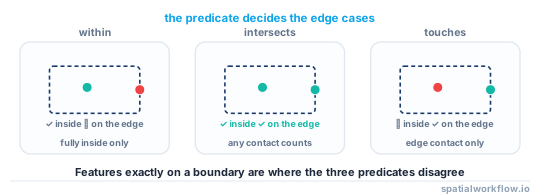
withinexcludes boundary-only casesintersectsincludes touching and overlapping casescontainsdepends on geometry direction
This pattern is useful in automation because it can be reused in scripts: load layers, align CRS, run the spatial filter, and export the result.
Edge cases and notes
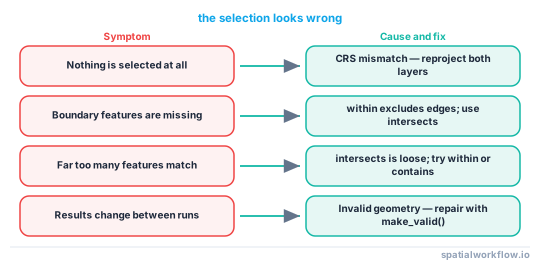
- CRS mismatch is the most common reason for empty results. Always compare
gdf1.crsandgdf2.crs. - Invalid geometries can break spatial matching or give unreliable output. Check
is_validbefore joining or filtering. - Boundary-touching features may not be returned by
within. Useintersectsif touching the boundary should count. - Duplicate matches can occur with
sjoin()if one feature matches multiple polygons. - Large datasets are usually faster with
sjoin()than manual loops, but performance still depends on geometry complexity and data size. - Null geometries should be removed or handled before spatial operations.
Distance-based selection
For distance-based selection, use a projected CRS before buffering so the distance is measured in meters or feet rather than degrees.
import geopandas as gpd

rivers = gpd.read_file("data/rivers.shp")
buildings = gpd.read_file("data/buildings.shp").to_crs(rivers.crs)

# Reproject first if rivers is in a geographic CRS such as EPSG:4326
river_buffer = rivers.buffer(100).union_all()
nearby_buildings = buildings[buildings.intersects(river_buffer)]

print(f"Buildings within 100 units of rivers: {len(nearby_buildings)}")
Internal links
For the broader workflow, see Spatial joins in GeoPandas.
Related tasks:
- How to Reproject Spatial Data in Python (GeoPandas)
- How to Read a Shapefile in Python with GeoPandas
For exporting filtered results, see How to Export GeoJSON in Python with GeoPandas.
If your query returns nothing, see Why GeoPandas Spatial Join Returns No Results.
FAQ
How do I select points inside polygons in GeoPandas?
Use within() against a polygon geometry or use gpd.sjoin() with predicate="within".
selected = gpd.sjoin(points, polygons, how="inner", predicate="within")Should I use within or intersects?
Use within when the feature must be fully inside another geometry. Use intersects when touching the boundary should count as a match.
Why does my spatial selection return no rows?
Common causes are:
- CRS mismatch
- invalid geometries
- wrong predicate choice
- null or empty geometries
Can I export selected features to a new file?
Yes. After filtering, save the result with to_file().
selected.to_file("output/selected_features.geojson", driver="GeoJSON")Is sjoin() better than geometry methods?
Use geometry methods for simple comparisons against one geometry. Use sjoin() when comparing two layers feature by feature.
How do I select features within a distance of another layer?
Buffer the reference layer in a projected CRS, then test intersection. For example, reproject to metres, build target.buffer(500).union_all(), and keep features where gdf.intersects(buffered) is true. The buffer distance is in the CRS units, so use a metric CRS such as EPSG:32633.
How do I keep the polygon attributes when selecting points with sjoin()?
gpd.sjoin() already carries the right-layer attributes into the result, so a within join of points to polygons returns each point row with its containing polygon's columns attached. Drop the leftover index_right column afterward if you do not need it.
Why does sjoin() return more rows than my input layer?
A feature that matches more than one geometry in the other layer produces one output row per match, for example a point falling on a shared boundary or in overlapping polygons. Deduplicate on the original index or fix overlapping reference geometries if you expected one row per feature.
How do I select features that are NOT inside a boundary?
Run a left join with predicate="within", then keep the unmatched rows where the joined index is null:
joined = gpd.sjoin(points, area, how="left", predicate="within")
outside = joined[joined["index_right"].isna()]
Does the order of layers matter in gpd.sjoin()?
Yes. The first argument is the left layer whose rows and geometry are preserved, and the predicate is read left-to-right, so sjoin(points, polygons, predicate="within") tests whether each point is within a polygon. Swapping the layers changes both the kept geometry and the meaning of the predicate.