
How to Aggregate Spatial Data by Region in GeoPandas
Problem statement
A common GIS task is to summarize smaller spatial features inside larger regions.
Examples:
- count incident points in each district
- sum parcel values by county
- average sensor readings by service area
- summarize grid cell data by administrative boundary
In GeoPandas, this usually means assigning features to region polygons first, then grouping by a region ID and calculating summary statistics. If you need a final map layer, you then join the aggregated results back to the region polygons.
This is a common workflow to aggregate spatial data by region in GeoPandas.
Quick answer
To aggregate spatial data by region in GeoPandas:
- load the source features and region polygons
- make sure both layers use the same CRS
- assign features to regions with
gpd.sjoin() - group by the region ID
- calculate counts, sums, means, or other statistics
- merge the result back to the region polygons if needed
import geopandas as gpd

points = gpd.read_file("data/incidents.gpkg")
regions = gpd.read_file("data/districts.gpkg")

if points.crs != regions.crs:
    points = points.to_crs(regions.crs)

joined = gpd.sjoin(
    points,
    regions[["district_id", "geometry"]],
    how="left",
    predicate="within"
)

summary = (
    joined.groupby("district_id")
    .agg(
        point_count=("incident_id", "count"),
        total_value=("value", "sum"),
        avg_value=("value", "mean")
    )
    .reset_index()
)

result = regions.merge(summary, on="district_id", how="left")
result["point_count"] = result["point_count"].fillna(0).astype(int)
Aggregation pipeline
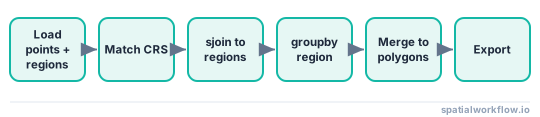
Step-by-step solution
Load the spatial layers
In this example, the source layer contains incident points and the region layer contains district polygons.
import geopandas as gpd

points = gpd.read_file("data/incidents.gpkg")
districts = gpd.read_file("data/districts.gpkg")

print(points.head())
print(districts.head())
Check the columns you will aggregate
Before joining anything, identify:
- the region ID field, such as
district_id - the value field to summarize, such as
severityorsales - any fields needed for filtering
print(points.columns)
print(districts.columns)
Example expected fields:
points:incident_id,severity,geometrydistricts:district_id,district_name,geometry
Use a stable key like district_id for grouping instead of a name field when possible.
Make sure both layers use the same coordinate reference system
If the layers use different coordinate reference systems, the spatial join can return wrong matches or no matches.
print("Points CRS:", points.crs)
print("Districts CRS:", districts.crs)
If needed, reproject one layer:
if points.crs != districts.crs:
    points = points.to_crs(districts.crs)
If you plan to calculate area or distance later, use an appropriate projected CRS. For point-in-polygon assignment, matching CRS is the main requirement.
Assign features to regions
Use a spatial join to match source features to polygons.
joined = gpd.sjoin(
    points,
    districts[["district_id", "geometry"]],
    how="left",
    predicate="within"
)

print(joined.head())
This adds the district_id from the polygon layer onto each matching point.
Choose the correct spatial predicate
The right predicate depends on your data:
within: point is inside polygonintersects: geometries touch or overlapcontains: polygon contains geometry
For point-in-polygon work, within is usually the clearest choice. If boundary behavior matters, test within and intersects on a small sample, because intersects can create multiple matches where polygons touch or overlap.
Aggregate the data by region
To count how many points fall in each district:
counts = (
    joined.groupby("district_id")
    .size()
    .reset_index(name="point_count")
)

print(counts.head())
If the source layer has a numeric field such as severity, sales, or population, you can summarize it:
summary = (
    joined.groupby("district_id")
    .agg(
        point_count=("incident_id", "count"),
        severity_sum=("severity", "sum"),
        severity_mean=("severity", "mean")
    )
    .reset_index()
)

print(summary.head())
You can also calculate several statistics in one operation:
summary = (
    joined.groupby("district_id")
    .agg(
        point_count=("incident_id", "count"),
        severity_sum=("severity", "sum"),
        severity_mean=("severity", "mean"),
        severity_min=("severity", "min"),
        severity_max=("severity", "max")
    )
    .reset_index()
)
This pattern also works for other feature types, such as lines or polygons assigned to regions, but the join logic and duplicate-match handling become more important when features cross boundaries or overlap multiple regions.
Code examples
Example: aggregate customer points by district
This example counts customer locations by district and summarizes a sales field.
import geopandas as gpd

customers = gpd.read_file("data/customer_locations.geojson")
districts = gpd.read_file("data/districts.gpkg")

if customers.crs != districts.crs:
    customers = customers.to_crs(districts.crs)

joined = gpd.sjoin(
    customers,
    districts[["district_id", "geometry"]],
    how="left",
    predicate="within"
)

district_sales = (
    joined.groupby("district_id")
    .agg(
        customer_count=("customer_id", "count"),
        sales_sum=("sales", "sum"),
        sales_mean=("sales", "mean")
    )
    .reset_index()
)

districts_out = districts.merge(district_sales, on="district_id", how="left")
districts_out["customer_count"] = districts_out["customer_count"].fillna(0).astype(int)
districts_out["sales_sum"] = districts_out["sales_sum"].fillna(0)
Export the summarized polygons
Save the result for use in QGIS, a web map, or another script.
districts_out.to_file("output/district_sales.geojson", driver="GeoJSON")
districts_out.to_file("output/district_sales.gpkg", driver="GPKG")
Explanation
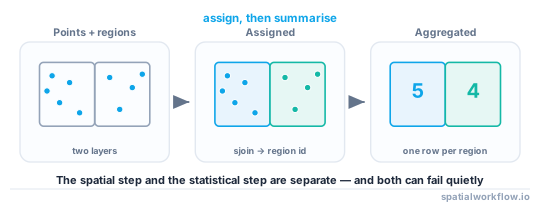
The workflow has two parts:
- spatial assignment
- tabular aggregation
gpd.sjoin() handles the spatial part. It determines which features belong to which regions. After that, the result is a regular table with region IDs attached, so standard groupby() aggregation works.
That is why spatial join plus grouping is a common pattern for regional summaries in GeoPandas.
When to use spatial join versus dissolve
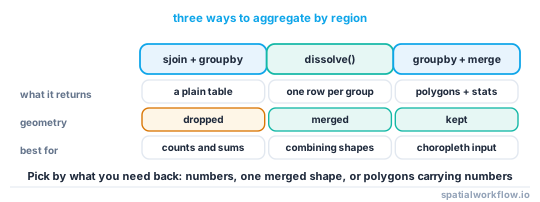
Use sjoin() when you need to assign one layer to another based on location, such as points to polygons.
Use dissolve() when you already have polygons with a grouping field and want to merge them into larger polygons while also aggregating attributes.
Examples:
- points to districts →
sjoin() - parcels to counties by containment → usually
sjoin() - many district polygons into provinces by province code →
dissolve()
Why region IDs matter for reliable grouping
Group by a stable ID like district_id, not district_name.
Names can change, contain duplicates, or vary in spelling. IDs are more reliable for joins, aggregation, and export.
Merge summary tables back to polygons
After aggregation, merge the summary table back to the district polygons so the output can be mapped or exported.
districts_summary = districts.merge(summary, on="district_id", how="left")

print(districts_summary.head())
If some districts have no matching features, the merged values will be null:
districts_summary["point_count"] = districts_summary["point_count"].fillna(0).astype(int)
districts_summary["severity_sum"] = districts_summary["severity_sum"].fillna(0)
For mean values, leaving nulls is often better than filling with zero.
Edge cases and notes
- CRS issues: If the layers do not share the same CRS, spatial joins can fail or produce incorrect matches.
- Invalid geometries: Broken polygon geometries can cause unexpected join results. Check with
districts.is_valid. If needed, prefermake_valid()when available.
districts = districts.copy()
districts["geometry"] = districts.make_valid()
Fallback if make_valid() is not available:
districts = districts.copy()
districts["geometry"] = districts.buffer(0)- Features on polygon boundaries: A point exactly on a boundary may not match with
within. Testingintersectscan help, but it can also create multiple matches if polygons touch or overlap. - One feature matching multiple regions: If polygons overlap, one source feature can join to multiple regions, which duplicates records in the aggregation.
- Null values in numeric fields:
countignores nulls in the chosen column, whilesize()counts rows. Use the one that matches your task. - Large datasets and performance: Keep only required columns before
sjoin(), use efficient file formats like GeoPackage or Parquet where possible, and write intermediate outputs for long workflows. - Lines or polygons as input features: If a line or polygon spans multiple regions, a simple spatial join may duplicate it across regions. If you need proportional summaries, use an overlay workflow instead of a direct join.
Internal links
For the broader concept behind this workflow, see Spatial Joins in GeoPandas: How They Work and When to Use Them.
If your main task is just point counting, see How to Count Points Within Polygons in GeoPandas.
If you need to merge polygons and summarize their attributes, see How to Dissolve Polygons and Aggregate Attributes in GeoPandas.
If your join returns no matches or obviously wrong results, check How to Fix CRS Mismatch and Empty Spatial Join Results in GeoPandas.
For related setup tasks, see How to Reproject Spatial Data in Python (GeoPandas) and How to Export GeoJSON in Python with GeoPandas.
FAQ
How do I count points in each polygon in GeoPandas?
Use gpd.sjoin() to assign points to polygons, then group by the polygon ID.
joined = gpd.sjoin(points, polygons[["region_id", "geometry"]], predicate="within")
counts = joined.groupby("region_id").size().reset_index(name="point_count")
Should I use sjoin() or dissolve() for regional summaries?
Use sjoin() when features must be assigned to regions based on location. Use dissolve() when polygons already have a grouping field and need to be merged into larger areas.
Why does my spatial join return no matches?
The most common causes are:
- CRS mismatch
- invalid geometries
- wrong predicate
- points falling outside the polygon extent
Check CRS first, then inspect a sample on a map.
How do I include regions with no features in the output?
Merge the summary table back to the region polygons with how="left", then fill counts or sums as needed.
result = polygons.merge(summary, on="region_id", how="left")
result["point_count"] = result["point_count"].fillna(0).astype(int)
Can I calculate multiple summary statistics at once?
Yes. Use groupby().agg() with named aggregations.
summary = joined.groupby("region_id").agg(
    count=("id", "count"),
    value_sum=("value", "sum"),
    value_mean=("value", "mean")
).reset_index()
How do I find the most common category per region instead of a sum or mean?
Use a named aggregation with a lambda that returns the mode, for example top_class=("class", lambda s: s.mode().iloc[0]) inside groupby().agg(). This gives the most frequent value in each region, with ties resolved by the first sorted value.
How can I aggregate by two columns, such as region and year, at the same time?
Pass a list to groupby, like joined.groupby(["district_id", "year"]).agg(...). The result has one row per region-year combination, which you can later pivot or merge back to the region polygons as needed.
Why are my counts inflated after the spatial join?
If polygons overlap or features sit on shared boundaries with predicate="intersects", one feature can match several regions and be counted more than once. Switch to predicate="within" for point-in-polygon work, or de-duplicate on the source feature ID with joined.drop_duplicates("incident_id") before grouping.
How do I compute area-weighted statistics when features span multiple regions?
A plain sjoin() cannot split a feature across regions, so use gpd.overlay(features, regions, how="intersection") to cut each feature at region boundaries first. Recompute each piece's area in a projected CRS, then weight the values by that area before summing per region.
Can I sum the polygon area inside each region instead of summarizing an attribute?
Yes. After assigning features to regions, compute area on a projected layer with joined["piece_area"] = joined.geometry.area, then groupby("district_id")["piece_area"].sum(). Use overlay() rather than sjoin() if features cross region boundaries, so only the part inside each region is measured.