
How to Automate GIS Workflows with Python
Problem statement
Many GIS tasks are repetitive: open a file, check the CRS, reproject it, clean field names, remove bad records, and save a new copy. That works for one dataset, but it becomes slow and error-prone when you need to process 10, 50, or 200 files.
A common case is batch processing vector data such as shapefiles and GeoJSON files. You may receive files from different sources and need to standardize them to one CRS, keep only required fields, remove empty geometries, and export cleaned outputs to a separate folder.
This page shows how to automate a vector GIS workflow in Python with GeoPandas. The goal is to run the same steps on many files consistently.
Quick answer
To automate a GIS workflow in Python:
- define the repeated steps
- collect input files from a folder
- process each file with the same GeoPandas operations
- save outputs to a separate folder
Typical tools:
- Python
- GeoPandas
pathlib
A basic automation script can batch process shapefiles and GeoJSON files, reproject them, clean attributes, filter bad geometry records, and write standardized outputs automatically.
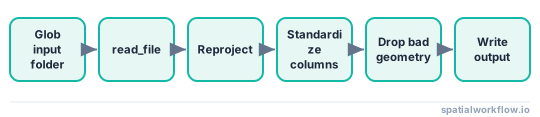
Batch processing pipeline
Step-by-step solution
Define the workflow first
Before writing code, list the exact steps you want to repeat. A simple vector workflow might be:
- load shapefiles or GeoJSON files
- check whether each file has a CRS
- reproject to a target CRS such as
EPSG:3857 - standardize column names
- drop rows with missing required values
- remove null, empty, or invalid geometries
- save processed files to a new folder
This matters because automation works best when the workflow is explicit and consistent.
Set up the Python environment
Install GeoPandas if needed:
pip install geopandasImports used in this tutorial:
from pathlib import Path
import geopandas as gpd
If you use Python regularly for GIS, keep a dedicated environment for geospatial packages.
Read vector files from an input folder
Use pathlib to collect files instead of hard-coding names.
from pathlib import Path

input_folder = Path("data/raw")
output_folder = Path("data/processed")
output_folder.mkdir(parents=True, exist_ok=True)

input_files = list(input_folder.glob("*.shp")) + list(input_folder.glob("*.geojson"))

print(f"Found {len(input_files)} files")
for file_path in input_files:
    print(file_path.name)
This pattern is useful for batch GIS work because you can drop new files into one folder and rerun the same script.
Apply the same processing steps to each file
The script below does four practical things:
- skips files with missing CRS metadata
- reprojects valid files to a target CRS
- standardizes column names
- removes bad geometry records and exports cleaned output
from pathlib import Path
import geopandas as gpd

input_folder = Path("data/raw")
output_folder = Path("data/processed")
output_folder.mkdir(parents=True, exist_ok=True)

target_crs = "EPSG:3857"

input_files = list(input_folder.glob("*.shp")) + list(input_folder.glob("*.geojson"))

for file_path in input_files:
    gdf = gpd.read_file(file_path)

    if gdf.crs is None:
        print(f"Skipping {file_path.name}: missing CRS")
        continue

    if gdf.crs.to_string() != target_crs:
        gdf = gdf.to_crs(target_crs)

    # standardize column names
    gdf.columns = [col.lower().replace(" ", "_") for col in gdf.columns]

    # remove empty or null geometries
    gdf = gdf[gdf.geometry.notnull()]
    gdf = gdf[~gdf.geometry.is_empty]

    # drop invalid geometries
    gdf = gdf[gdf.is_valid]

    # drop rows with null values in a required field if it exists
    if "name" in gdf.columns:
        gdf = gdf[gdf["name"].notna()]

    output_path = output_folder / f"{file_path.stem}_processed.geojson"
    gdf.to_file(output_path, driver="GeoJSON")

    print(f"Processed: {file_path.name} -> {output_path.name}")
This gives you a repeatable pattern for routine vector data processing.
Save outputs safely
A few details in the script are important:
output_folder.mkdir(parents=True, exist_ok=True)creates the output folder if needed- outputs use a new suffix such as
_processed - original files stay unchanged
- exporting to GeoJSON avoids some shapefile limitations during automation
If you need shapefile output instead:
output_path = output_folder / f"{file_path.stem}_processed.shp"
gdf.to_file(output_path)
Wrap the workflow in a reusable function
If you plan to run the workflow more than once, turn it into a function.
from pathlib import Path
import geopandas as gpd

def process_vector_files(input_folder, output_folder, target_crs="EPSG:3857"):
    input_folder = Path(input_folder)
    output_folder = Path(output_folder)
    output_folder.mkdir(parents=True, exist_ok=True)

    input_files = list(input_folder.glob("*.shp")) + list(input_folder.glob("*.geojson"))

    for file_path in input_files:
        gdf = gpd.read_file(file_path)

        if gdf.crs is None:
            print(f"Skipping {file_path.name}: missing CRS")
            continue

        if gdf.crs.to_string() != target_crs:
            gdf = gdf.to_crs(target_crs)

        gdf.columns = [col.lower().replace(" ", "_") for col in gdf.columns]
        gdf = gdf[gdf.geometry.notnull()]
        gdf = gdf[~gdf.geometry.is_empty]
        gdf = gdf[gdf.is_valid]

        if "name" in gdf.columns:
            gdf = gdf[gdf["name"].notna()]

        output_path = output_folder / f"{file_path.stem}_processed.geojson"
        gdf.to_file(output_path, driver="GeoJSON")

        print(f"Saved {output_path}")

if __name__ == "__main__":
    process_vector_files("data/raw", "data/processed", target_crs="EPSG:3857")
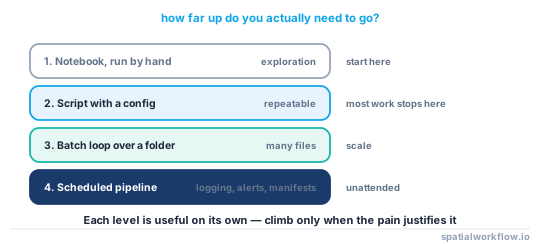
This structure is easier to reuse in scheduled jobs, command-line scripts, or larger data pipelines.
Code examples
Example 1: Batch read and export vector files
from pathlib import Path
import geopandas as gpd

input_folder = Path("data/raw")
output_folder = Path("data/exported")
output_folder.mkdir(parents=True, exist_ok=True)

for file_path in list(input_folder.glob("*.shp")) + list(input_folder.glob("*.geojson")):
    gdf = gpd.read_file(file_path)
    output_path = output_folder / f"{file_path.stem}.geojson"
    gdf.to_file(output_path, driver="GeoJSON")
Example 2: Reproject all files to one CRS
from pathlib import Path
import geopandas as gpd

target_crs = "EPSG:32633"
output_folder = Path("data/reprojected")
output_folder.mkdir(parents=True, exist_ok=True)

for file_path in Path("data/raw").glob("*.shp"):
    gdf = gpd.read_file(file_path)
    if gdf.crs is None:
        continue
    if gdf.crs.to_string() != target_crs:
        gdf = gdf.to_crs(target_crs)
    gdf.to_file(output_folder / f"{file_path.stem}_utm33n.geojson", driver="GeoJSON")
Example 3: Clean attributes during automation
import geopandas as gpd

gdf = gpd.read_file("data/raw/parcels.shp")
gdf = gdf.rename(columns={"Parcel ID": "parcel_id", "OwnerName": "owner_name"})
gdf = gdf[["parcel_id", "owner_name", "geometry"]]
gdf = gdf[gdf["parcel_id"].notna()]
gdf.to_file("data/processed/parcels_clean.geojson", driver="GeoJSON")
Example 4: Wrap a cleaning step in a reusable function
from pathlib import Path
import geopandas as gpd

def clean_layer(file_path, output_folder, target_crs):
    gdf = gpd.read_file(file_path)
    if gdf.crs is None:
        return

    if gdf.crs.to_string() != target_crs:
        gdf = gdf.to_crs(target_crs)

    gdf.columns = [c.lower().replace(" ", "_") for c in gdf.columns]
    gdf = gdf[gdf.geometry.notnull() & ~gdf.geometry.is_empty & gdf.is_valid]

    output_folder = Path(output_folder)
    output_folder.mkdir(parents=True, exist_ok=True)

    output_path = output_folder / f"{Path(file_path).stem}_clean.geojson"
    gdf.to_file(output_path, driver="GeoJSON")
Explanation
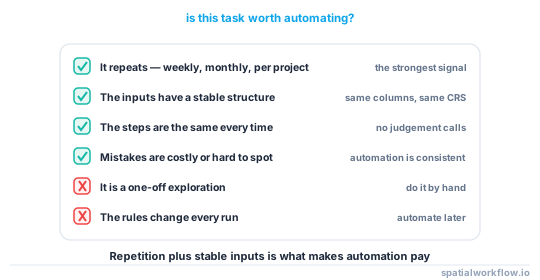
GIS automation with Python is useful when you need to apply the same rules to many datasets. Instead of repeating the same clicks in desktop software, you write the workflow once and run it on every file.
GeoPandas is a good fit for this type of vector workflow because it handles:
- reading and writing common vector formats
- column and attribute cleanup
- CRS conversion with
to_crs() - filtering rows based on geometry or attribute rules
This approach works well for:
- repeated vector data cleaning
- standardizing data from multiple sources
- routine reporting workflows
- small to medium batch jobs
It is also easier to audit. When the logic is in code, you can see exactly how each dataset was processed.
Edge cases or notes
Missing CRS metadata
If gdf.crs is None, do not guess unless you know the source CRS. A wrong CRS assignment can break the rest of the workflow. Skip those files and fix the metadata first.
Different CRS values across input files
Different source CRS values are normal. The important part is that each file has correct CRS metadata before reprojection.
Invalid geometries
The line below removes invalid features:
gdf = gdf[gdf.is_valid]That is useful for cleaning, but it drops features rather than repairing them. If you need to keep invalid features, use a geometry repair step instead of filtering them out.
Area calculations need the right projected CRS
EPSG:3857 is convenient for web mapping, but it is not a good default for accurate area calculations. If you need area values, reproject to an appropriate projected CRS for your region and analysis before using gdf.area.
Shapefile limitations
Shapefiles have field name length limits and more restrictive data typing. For automated workflows, GeoJSON or GeoPackage is often easier to work with as an output format.
Large datasets
GeoPandas works well for many file-based workflows, but large datasets can use a lot of memory. For bigger jobs, consider formats and tools such as GeoPackage, Parquet, or PostGIS.
Avoid overwriting source data
Write outputs to a separate folder and use clear file name suffixes such as _processed or _clean. That reduces the risk of accidental data loss.
Internal links
For a broader overview, see Python GIS automation basics.
Related task guides:
- How to Read a Shapefile in Python with GeoPandas
- How to Reproject Spatial Data in Python (GeoPandas)
If you need to export cleaned outputs, see How to Export GeoJSON in Python with GeoPandas.
FAQ
How do I automate multiple shapefiles in Python?
Use pathlib to collect all .shp files in a folder, loop through them with GeoPandas, apply the same processing steps, and save each result to an output folder.
What Python library is best for GIS workflow automation?
For vector file workflows, GeoPandas is usually the best starting point. It covers reading, writing, reprojection, filtering, and attribute cleanup in one workflow.
Can I automate reprojection and attribute cleaning in one script?
Yes. A single GeoPandas script can read a file, reproject it with to_crs(), rename fields, drop rows, filter invalid geometries, and export the cleaned result.
What should I do if some input files have different CRS values?
That is usually fine if the CRS metadata is correct. Read each file, check gdf.crs, and convert it to a shared target CRS before export. If CRS metadata is missing, fix that first.
How do I log errors so one bad file does not stop the whole batch?
Wrap each file's processing in a try/except inside the loop and print or log the failure, then continue. That way a single corrupt or unreadable file is recorded and skipped instead of crashing the entire run.
Can I process files in subfolders recursively?
Yes. Use Path("data/raw").rglob("*.shp") instead of glob(). rglob walks every subdirectory, which is useful when input files are organized into per-region or per-date folders.
How do I write all processed layers into a single GeoPackage instead of separate files?
Call to_file() on the same .gpkg path and pass a distinct layer= name for each file:
gdf.to_file("data/processed/output.gpkg", layer=file_path.stem, driver="GPKG")A GeoPackage can hold many layers, which keeps batch outputs in one file.
Should I repair invalid geometries instead of dropping them during automation?
If you need to keep every feature, replace the gdf[gdf.is_valid] filter with gdf["geometry"] = gdf.geometry.make_valid(). This fixes self-intersections and similar issues in place rather than discarding the affected rows.