How to Convert a Raster to a Vector in Python
Problem statement
A common GIS task is converting raster data into vector polygons. This usually comes up when you have a classified raster, binary mask, or land cover grid and need polygon features for analysis, editing, or export.
Typical examples include:
- extracting land cover classes from a classified TIFF
- converting a flood mask into polygons
- turning valid raster regions into a Shapefile or GeoJSON
- creating vector boundaries from a suitability or segmentation raster
In Python, the standard workflow uses:
rasterioto read the rasterrasterio.features.shapesto polygonize pixel regionsGeoPandasto store and export the resultShapelyto build geometry objects
This works best for categorical rasters where neighboring pixels share the same class value.
Quick answer
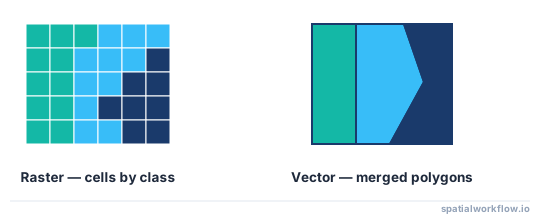
To convert a raster to vector polygons in Python, the usual workflow is:
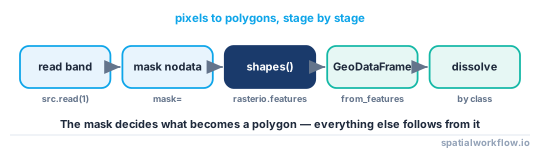
- open the raster with Rasterio
- read the raster band and define a valid-data mask
- extract polygons with
rasterio.features.shapes - load the results into a GeoDataFrame
- save to Shapefile or GeoJSON
Basic example:
import os
import rasterio
from rasterio.features import shapes
import geopandas as gpd
from shapely.geometry import shape

raster_path = "data/landcover.tif"
output_path = "output/landcover_polygons.shp"

os.makedirs("output", exist_ok=True)

with rasterio.open(raster_path) as src:
    band = src.read(1)
    crs = src.crs
    mask = band != src.nodata if src.nodata is not None else band > 0

    records = []
    for geom, value in shapes(band, mask=mask, transform=src.transform):
        records.append({"geometry": shape(geom), "class_value": int(value)})

gdf = gpd.GeoDataFrame(records, crs=crs)
gdf.to_file(output_path)
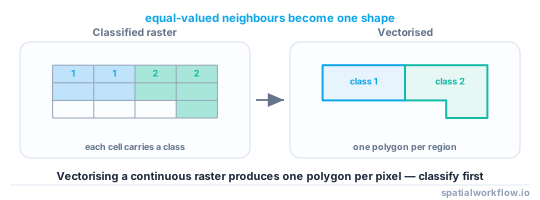
This approach is best for classified rasters. For continuous rasters like elevation or imagery, reclassify first or you may create too many polygons.
Step-by-step solution
Step 1: Load the raster and inspect its values
Before polygonizing, check the raster metadata and values. You need to know:
- CRS
- affine transform
- nodata value
- raster class values
import numpy as np
import rasterio

raster_path = "data/landcover.tif"

with rasterio.open(raster_path) as src:
    band = src.read(1)
    print("CRS:", src.crs)
    print("Transform:", src.transform)
    print("NoData:", src.nodata)

    unique_values = np.unique(band)
    print("Unique values:", unique_values[:20])
    print("Total unique values:", len(unique_values))
If the raster has only a small set of repeated values such as 1, 2, 3, 4, it is suitable for polygonizing. If it has many unique values, it is probably continuous data and should usually be reclassified first.
For very large rasters, np.unique() can be slow or memory-intensive. In that case, inspect a smaller clipped area first or review the raster class definitions from its source.
Step 2: Filter out nodata or background pixels
You usually do not want nodata or background cells turned into polygons. Build a mask so only valid cells are included.
with rasterio.open(raster_path) as src:
    band = src.read(1)

    if src.nodata is not None:
        mask = band != src.nodata
    else:
        mask = band > 0  # example if 0 is background
The mask controls which cells are polygonized. This is important for clean output.
Step 3: Convert raster regions to vector geometries
Use rasterio.features.shapes to extract polygons. It returns geometry/value pairs. Adjacent pixels with the same value are grouped into polygon features.
from rasterio.features import shapes

with rasterio.open(raster_path) as src:
    band = src.read(1)
    mask = band != src.nodata if src.nodata is not None else band > 0

    results = shapes(band, mask=mask, transform=src.transform)

    for geom, value in results:
        print(value, geom["type"])
        break
The transform is required so raster row and column positions become real map coordinates.
Step 4: Build a GeoDataFrame from the extracted shapes
Convert the GeoJSON-like geometry dictionaries into Shapely geometries, then create a GeoDataFrame.
import geopandas as gpd
from shapely.geometry import shape

with rasterio.open(raster_path) as src:
    band = src.read(1)
    crs = src.crs
    mask = band != src.nodata if src.nodata is not None else band > 0

    records = []
    for geom, value in shapes(band, mask=mask, transform=src.transform):
        records.append({
            "geometry": shape(geom),
            "class_value": int(value)
        })

gdf = gpd.GeoDataFrame(records, crs=crs)
print(gdf.head())
Now each polygon has a class_value attribute from the raster.
Step 5: Save the output as Shapefile or GeoJSON
Export the GeoDataFrame in the format you need.
import os

os.makedirs("output", exist_ok=True)

gdf.to_file("output/landcover_polygons.shp")
gdf.to_file("output/landcover_polygons.geojson", driver="GeoJSON")
Shapefile is widely supported. GeoJSON is often easier for web mapping and data exchange.
Code examples
Example 1: Convert a classified raster to polygons
This is the standard workflow for a land cover raster.
import os
import rasterio
from rasterio.features import shapes
import geopandas as gpd
from shapely.geometry import shape

input_raster = "data/landcover.tif"
output_vector = "output/landcover_polygons.shp"

os.makedirs("output", exist_ok=True)

with rasterio.open(input_raster) as src:
    band = src.read(1)
    crs = src.crs
    mask = band != src.nodata if src.nodata is not None else band > 0

    features = [
        {"geometry": shape(geom), "class_value": int(value)}
        for geom, value in shapes(band, mask=mask, transform=src.transform)
    ]

gdf = gpd.GeoDataFrame(features, crs=crs)
gdf.to_file(output_vector)
Example 2: Convert only one raster class to vector
If you only want one value, such as flooded cells coded as 1, create a boolean mask for that class.
import os
import rasterio
from rasterio.features import shapes
import geopandas as gpd
from shapely.geometry import shape
import numpy as np

input_raster = "data/flood_mask.tif"
output_vector = "output/flooded_areas.shp"
target_value = 1

os.makedirs("output", exist_ok=True)

with rasterio.open(input_raster) as src:
    band = src.read(1)
    class_mask = band == target_value

    features = []
    for geom, value in shapes(
        band.astype(np.int16),
        mask=class_mask,
        transform=src.transform
    ):
        if int(value) == target_value:
            features.append({
                "geometry": shape(geom),
                "class_value": int(value)
            })

    gdf = gpd.GeoDataFrame(features, crs=src.crs)

gdf.to_file(output_vector)
This is useful when only one class matters, such as flooded versus not flooded.
Example 3: Export raster polygons to GeoJSON
To create GeoJSON output, use the same extraction process and write GeoJSON.
import os
import rasterio
from rasterio.features import shapes
import geopandas as gpd
from shapely.geometry import shape

input_raster = "data/landcover.tif"
output_geojson = "output/landcover_polygons.geojson"

os.makedirs("output", exist_ok=True)

with rasterio.open(input_raster) as src:
    band = src.read(1)
    crs = src.crs
    mask = band != src.nodata if src.nodata is not None else band > 0

    records = []
    for geom, value in shapes(band, mask=mask, transform=src.transform):
        records.append({
            "geometry": shape(geom),
            "class_value": int(value)
        })

gdf = gpd.GeoDataFrame(records, crs=crs)
gdf.to_file(output_geojson, driver="GeoJSON")
Explanation
When you polygonize a raster in Python, the raster is scanned for groups of adjacent pixels with the same value. Each region becomes a polygon.
The key parts are:
- raster band values: define which class each cell belongs to
- mask: limits extraction to valid cells
- transform: converts pixel coordinates into map coordinates
- CRS: keeps the output aligned with other GIS layers
rasterio.features.shapes does not create one polygon per cell unless every cell is isolated. It groups neighboring cells with the same value into larger polygons.
This is different from other raster-to-vector tasks:
- polygonizing creates area features
- point conversion creates a point for each cell
- contour extraction creates lines from continuous surfaces
For most workflows, polygonizing is the right method when the raster represents zones or classes.
Edge cases and notes
Continuous rasters can produce too many polygons
Elevation rasters, temperature grids, and imagery often contain many unique values. If you polygonize them directly, the output may contain a huge number of tiny polygons. Reclassify first.
Small pixel regions may create noisy output
Classified rasters often contain isolated cells and slivers. These become small polygons. A common follow-up step is to:
- dissolve polygons by class
- filter small areas
- smooth boundaries if appropriate
Nodata handling affects the result
If nodata is missing or incorrect, you may get unwanted polygons around empty cells. Always check src.nodata and confirm the mask logic.
CRS must be preserved
The output GeoDataFrame should use the raster CRS:
gdf = gpd.GeoDataFrame(records, crs=crs)If the output does not align with other layers, the problem is usually CRS assignment or later reprojection.
Invalid geometries can appear
Polygonized output can sometimes include invalid geometries, especially from complex raster edges. Check validity if later overlay operations fail:
invalid = ~gdf.is_valid
print(gdf[invalid])
Large rasters can be slow to polygonize
Very large rasters can be slow and memory-intensive to process. The output can also contain complex or multipart geometries. In practice, it often helps to clip the raster to the area of interest first.
Internal links
If you need background on when this workflow makes sense, see Raster vs vector data in GIS.
Related next steps:
If your output layer does not line up with other data, see How to fix CRS mismatch errors in GeoPandas.
FAQ
How do I convert a raster to polygons in Python?
Use rasterio to read the raster and rasterio.features.shapes to extract polygon geometries from grouped pixel regions. Then store the result in a GeoDataFrame and export it.
What Python library is used to polygonize a raster?
The standard tool is rasterio.features.shapes. GeoPandas is commonly used after that to manage and save the vector output.
Can I convert only one raster value to vector polygons?
Yes. Build a mask such as band == 1 and polygonize only that class. This is common for binary masks like flooded versus not flooded.
Why does raster to vector conversion create too many polygons?
This usually happens when the raster is continuous or noisy. Many unique values or isolated pixels create many separate polygon regions. Reclassification or filtering is often needed first.
How do I save polygonized raster output as a Shapefile or GeoJSON?
Use GeoPandas:
gdf.to_file("output.shp")
gdf.to_file("output.geojson", driver="GeoJSON")
Shapefile is widely supported, while GeoJSON is often easier for web and exchange workflows.
How do I dissolve the polygonized output by class value?
After building the GeoDataFrame, group by the class attribute and merge geometries: gdf.dissolve(by="class_value"). This combines all polygons of the same class into one multipolygon feature.
How do I remove tiny sliver polygons after polygonizing?
Compute area in a projected CRS and filter by a threshold, for example gdf = gdf[gdf.geometry.area > 100]. Make sure the layer is in a metric CRS such as a UTM zone first, or the area values will be in degrees.
Does rasterio.features.shapes use 4-connectivity or 8-connectivity?
By default it uses 4-connectivity, so only pixels sharing an edge are merged into the same polygon. Pass connectivity=8 to also merge pixels that touch only at a corner.
Why does rasterio.features.shapes raise a dtype error on my band?
shapes accepts only certain dtypes (such as int16, int32, uint8, float32). Cast the band first, for example band.astype("int32"), which is why float64 or int64 arrays often need conversion before polygonizing.
How do I go the other way and rasterize vector polygons back to a raster?
Use rasterio.features.rasterize, passing (geometry, value) pairs with an out_shape and transform. It is the inverse of shapes and burns polygon values into a pixel grid.