
Fiona ImportError When Using GeoPandas: How to Fix It
Problem statement
A common Python GIS installation problem is a Fiona import error when using GeoPandas. It usually appears in one of these situations:
import geopandasfailsimport fionafailsgpd.read_file("roads.shp")fails when reading a shapefile or GeoJSON
Typical errors include:
ImportError: No module named fionaor platform-specific binary errors such as:
ImportError: DLL load failed while importing fionaYou may also see GDAL-related messages, version mismatch errors, or shared library load failures.
The practical issue is simple: GeoPandas cannot use Fiona-based vector file reading until Fiona and its compiled dependencies work correctly. The goal is to find out whether the problem comes from a missing package, the wrong Python environment, mixed package managers, or broken binary dependencies, then fix it with the least risky approach.
Quick answer
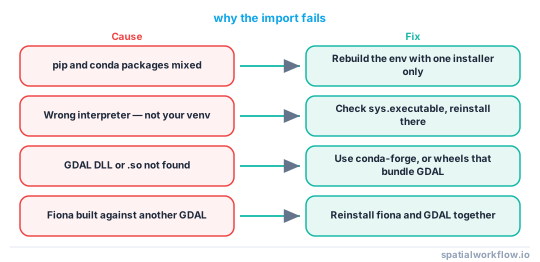
Fiona is a common GeoPandas vector I/O dependency in many environments and is often used for reading formats such as shapefiles and GeoJSON. Most Fiona import errors with GeoPandas come from one of these causes:
- Fiona is not installed in the active Python environment
- GeoPandas and Fiona were installed in different environments
pipandcondapackages were mixed in one environment- Fiona or GDAL-related binary dependencies are broken
- Installed package versions are incompatible
The fastest reliable fix is:
- confirm which Python environment is actually running
- check whether
geopandasandfionaare installed there - reinstall both from the same package manager
- if the environment is messy, create a clean conda environment and reinstall everything there
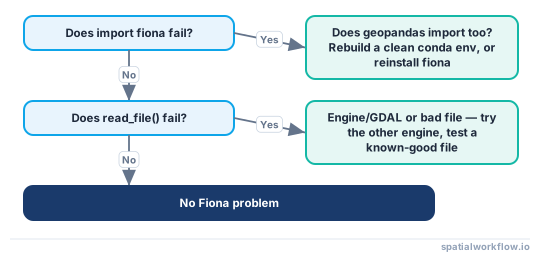
Diagnosis at a glance
Step-by-step solution
Check the exact Fiona ImportError
Identify whether the error happens on import or on read_file()
Start by separating these cases:
import geopandas as gpdimport fionaimport geopandas as gpd
gdf = gpd.read_file("data/roads.shp")This matters because:
- if
import fionafails, the problem is Fiona itself - if
import geopandasfails, the issue may be a deeper dependency conflict - if imports work but
read_file()fails, the issue may be the file I/O engine, GDAL-related dependencies, file access, or the input dataset itself
Copy the full traceback before changing anything
Do not troubleshoot from the last line only. Copy the full traceback first. It often tells you whether the problem is:
- missing package
- missing DLL or shared library
- incompatible compiled dependency
- wrong Python environment
Code examples
Confirm you are using the correct Python environment
Check which Python executable is running
A common cause is installing packages into one environment and running code in another.
Use this to check the active interpreter:
import sys
print(sys.executable)If you are in Jupyter, run the same command in a notebook cell. The result should match the environment where you installed GeoPandas and Fiona.
From a terminal, you can also check:
python -c "import sys; print(sys.executable)"Check whether GeoPandas and Fiona are installed in that environment
Use the same interpreter to inspect installed packages:
python -m pip show geopandas fiona shapely pyproj pandasIf Fiona does not appear, that explains the import error.
In Jupyter, also verify the kernel path:
import sys
print(sys.executable)If the notebook kernel uses a different Python than your shell, package installs may not affect the notebook.
Test Fiona separately from GeoPandas
Import Fiona directly
Run a minimal test:
import fiona
print(fiona.__version__)If this fails, the issue is not your GeoPandas code. It is an environment or installation problem.
Compare package versions
Check core package versions together:
import geopandas as gpd
import fiona
import shapely
import pyproj
import pandas as pd
print("geopandas:", gpd.__version__)
print("fiona:", fiona.__version__)
print("shapely:", shapely.__version__)
print("pyproj:", pyproj.__version__)
print("pandas:", pd.__version__)This helps identify version conflicts across the stack.
Fix the problem with pip
Reinstall Fiona and GeoPandas in the active environment
If you are using pip, uninstall conflicting copies first, then reinstall from the same interpreter:
python -m pip uninstall -y fiona geopandas
python -m pip install --upgrade pip
python -m pip install fiona geopandasIf you suspect broader conflicts, reinstall the related stack:
python -m pip uninstall -y fiona geopandas shapely pyproj pandas
python -m pip install geopandasUsing python -m pip is safer than plain pip because it targets the active interpreter.
Avoid mixing pip and conda in the same environment
Many Fiona and GDAL installation errors happen when some GIS packages came from conda and others from pip. That can break compiled libraries even if version numbers look correct.
If the current environment mixes package managers, rebuilding it is often faster than repairing it.
Fix the problem with conda
Install GeoPandas and Fiona from the same channel
For GIS packages, conda is often more reliable because it resolves compiled dependencies together.
Install both from one channel, preferably conda-forge:
conda install -c conda-forge geopandas fionaCreate a clean environment if the current one is broken
If you keep getting Fiona import errors, use a clean environment:
conda create -n gis-clean -c conda-forge python=3.11 geopandas fiona
conda activate gis-clean
python -c "import geopandas as gpd; import fiona; print(gpd.__version__, fiona.__version__)"This is often the most reliable fix.
Fix DLL, GDAL, or binary dependency errors
Recognize common binary error messages
Examples include:
DLL load failed while importing fiona- missing shared library errors
- GDAL version mismatch errors
- import succeeds in one shell but fails in another
These happen because Fiona depends on compiled geospatial libraries, not just pure Python code.
Resolve broken native dependencies
Use these rules:
- reinstall Fiona and GeoPandas from one package manager only
- do not manually copy DLL files into random folders
- make sure Python architecture matches installed packages, such as 64-bit Python with 64-bit packages
- prefer a clean environment over patching an old mixed one
On Windows, binary dependency problems are especially common.
Verify the fix by reading a spatial file
Test with a known-good shapefile or GeoJSON
After reinstalling, test both import and file reading:
import geopandas as gpd
gdf = gpd.read_file("data/cities.geojson")
print(gdf.head())
print(gdf.crs)Or with a shapefile:
import geopandas as gpd
gdf = gpd.read_file("data/roads.shp")
print(gdf.head())
print(gdf.geometry.name)Check the resulting GeoDataFrame
Make sure:
- the data loads without import errors
- the
geometrycolumn exists - the CRS is present if expected
Example:
print(gdf.columns)
print(gdf.geometry.isna().sum())
print(gdf.crs)Explanation
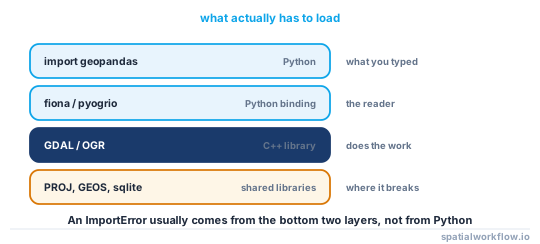
Fiona is a vector data I/O library used in many GeoPandas setups. Depending on the environment and engine configuration, GeoPandas may use Fiona to open shapefiles, GeoJSON, and other spatial file formats through read_file().
That is why a Fiona import error often blocks normal GeoPandas work even when your own code is correct.
GIS Python packages are more sensitive than pure Python libraries because they depend on compiled native libraries such as GDAL, PROJ, and GEOS. If one package was installed in a different environment, from a different package manager, or against incompatible binaries, imports can fail before any GIS logic runs.
In practice, diagnosis usually follows this order:
- confirm the active interpreter
- test
import fiona - inspect versions
- reinstall from one tool only
- create a clean environment if needed
Edge cases or notes
- Newer GeoPandas setups may use a different file I/O engine by default, so a
read_file()error is not always caused by Fiona alone. - The visible error may mention Fiona even when the root cause is GDAL or a broken shared library.
- Jupyter often uses a different kernel than the shell where packages were installed.
- On Windows, architecture mismatches and DLL issues are common.
- If your GIS environment has many mixed packages, rebuilding is usually faster than patching.
- A successful import does not guarantee the input file itself is valid, so test with a known-good shapefile or GeoJSON first.
- If
read_file()works but later operations fail, check CRS consistency before spatial joins or overlays. - If loaded layers contain invalid geometries, later processing may fail even though the Fiona import problem is fixed.
Internal links
For a broader setup guide, see How to Install GeoPandas in a Clean Python Environment.
If imports work and you want to test vector file reading next, see How to Read a Shapefile with GeoPandas and How to Read GeoJSON in GeoPandas.
If the problem only happens in notebooks, see GeoPandas Not Installed in Jupyter: How to Fix Kernel and Environment Mismatch.
For related troubleshooting, see GeoPandas Not Reading Shapefile: Common Causes and Fixes.
FAQ
Why does GeoPandas need Fiona?
GeoPandas may use Fiona for vector file reading in many environments, especially for formats such as shapefiles and GeoJSON. If Fiona is missing or broken, Fiona-based read_file() workflows can fail.
How do I know which Python environment my notebook is using?
Run:
import sys
print(sys.executable)That path shows the interpreter used by the current Jupyter kernel.
Should I use pip or conda for GeoPandas and Fiona?
Either can work, but use one package manager consistently within the same environment. For compiled GIS dependencies, conda-forge is often the safer option.
Why does Fiona install but still fail with a DLL error?
That usually means Fiona’s compiled dependencies are broken or incompatible. Common causes are mixed pip/conda installs, wrong architecture, or GDAL-related binary conflicts.
Can I use GeoPandas without Fiona installed?
In recent GeoPandas versions you can, because read_file() can use the pyogrio engine instead of Fiona. Pass engine="pyogrio" (after installing it) to bypass Fiona entirely: gpd.read_file("data/roads.shp", engine="pyogrio").
How do I check which I/O engine GeoPandas is using?
Inspect the configured default with geopandas.options.io_engine; if it is None, GeoPandas picks an available engine automatically. You can force one per call with engine="pyogrio" or engine="fiona" in read_file().
Why does import fiona work in the terminal but fail in Jupyter?
The notebook kernel is almost certainly pointing at a different Python environment than your shell. Run import sys; print(sys.executable) in both places and compare the paths; if they differ, install Fiona into the kernel's environment or switch the kernel.
Does upgrading to Fiona 1.9+ change how I open files?
The import name is still fiona, but newer releases bundle their own GDAL wheels on many platforms, which reduces external GDAL conflicts. If you previously installed a system GDAL to satisfy Fiona, a clean reinstall of the modern wheel often resolves leftover version-mismatch errors.