
Why Does My GeoPandas Map Look Upside Down?
Problem statement
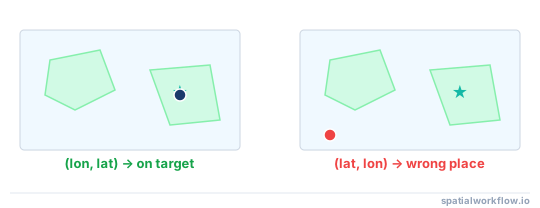
A GeoPandas map that looks upside down usually is not actually being flipped by GeoPandas.
What users usually mean is one of these problems:
- points appear in the wrong country or hemisphere
- a layer looks mirrored compared with expected boundaries
- one layer plots far away from another
- geometry appears reversed compared with a trusted reference layer or basemap
In most cases, the real cause is one of these GIS data issues:
- longitude and latitude were loaded in the wrong order
- the CRS is missing
- the CRS was assigned incorrectly
- one layer was not reprojected to match another
- projected coordinates were treated as decimal degrees
The practical fix is to inspect the coordinate values, confirm the CRS, and reproject only when needed.
Quick answer
If your GeoPandas plot looks upside down or clearly wrong:
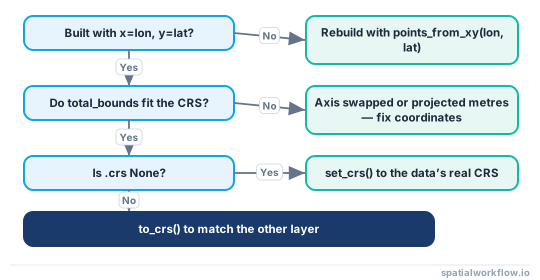
- Check whether point coordinates were created with
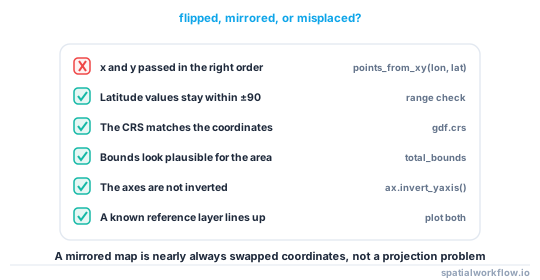
x=longitudeandy=latitude. - Print
gdf.crsto verify the current CRS. - If the CRS is missing but the coordinates are already correct, use
set_crs(). - If the data needs conversion to another CRS, use
to_crs(). - Print
gdf.total_boundsto detect impossible coordinate ranges. - Compare the layer against a trusted boundary or reference layer.
Diagnosis at a glance
Step-by-step solution
Step 1: Check whether x and y were reversed
For point data, GeoPandas expects:
x= longitude or eastingy= latitude or northing
A common mistake is building geometry from latitude, longitude instead of longitude, latitude. That can place data far from the expected location and make the map appear inverted.
Inspect a few rows before creating geometry:
import pandas as pd

df = pd.read_csv("points.csv")
print(df[["longitude", "latitude"]].head())
If your values are around:
- longitude:
-180to180 - latitude:
-90to90
then build geometry with longitude as x and latitude as y.
Step 2: Verify the current CRS
Always check the CRS before diagnosing plotting problems.
import geopandas as gpd

gdf = gpd.read_file("data/sample_points.geojson")
print(gdf.crs)
Typical cases:
None: no CRS metadataEPSG:4326: geographic coordinates in decimal degreesEPSG:3857: Web Mercator in meters
If gdf.crs is wrong or missing, GeoPandas cannot align the layer correctly with other data.
Step 3: Set the CRS correctly if it is missing
Use set_crs() only when the coordinate values are already in that CRS.
For example, if a dataset has decimal degree coordinates but no CRS metadata:
import geopandas as gpd

gdf = gpd.read_file("data/missing_crs.geojson")

if gdf.crs is None:
    gdf = gdf.set_crs("EPSG:4326")

print(gdf.crs)
Do not use set_crs() to convert coordinates from one CRS to another. It only labels the existing coordinates.
Step 4: Reproject the data if the CRS is correct but does not match other layers
If one layer is in EPSG:4326 and another is in EPSG:3857, plotting them together will look wrong unless they share the same CRS.
Use to_crs() to transform coordinates:
import geopandas as gpd
import matplotlib.pyplot as plt

cities = gpd.read_file("data/cities.geojson")         # EPSG:4326
roads = gpd.read_file("data/roads_3857.shp")          # EPSG:3857

cities = cities.to_crs(roads.crs)

ax = roads.plot(color="lightgray", figsize=(8, 6))
cities.plot(ax=ax, color="red", markersize=20)
plt.show()
This is the correct fix when layers do not align because they use different coordinate systems.
Step 5: Inspect bounds to spot impossible coordinate ranges
Bounds often reveal whether coordinates are in the wrong order or wrong CRS.
import geopandas as gpd

gdf = gpd.read_file("data/sample_points.geojson")

print("CRS:", gdf.crs)
print("Bounds:", gdf.total_bounds)
gdf.total_bounds returns:
[minx, miny, maxx, maxy]Interpret the values:
- values like
[-74.2, 40.5, -73.7, 40.9]look like WGS84 longitude/latitude - values like
[500000, 4500000, 550000, 4550000]look like projected meters - values like
[40.7, -74.0, 40.8, -73.9]may indicate latitude/longitude were swapped
If the coordinate ranges do not match the declared CRS, fix that before plotting.
Step 6: Compare with a known reference layer
A fast way to confirm whether the issue is location, CRS, or source coordinates is to compare your layer with a trusted boundary.
import geopandas as gpd
import matplotlib.pyplot as plt

problem = gpd.read_file("data/problem_points.geojson")
boundary = gpd.read_file("data/country_boundary.shp")

if problem.crs is not None and boundary.crs is not None and problem.crs != boundary.crs:
    problem = problem.to_crs(boundary.crs)

ax = boundary.plot(facecolor="none", edgecolor="black", figsize=(8, 6))
problem.plot(ax=ax, color="red", markersize=15)
plt.show()
If the points still land in the wrong place, the problem is usually bad coordinate values or a wrong CRS assignment rather than a display orientation issue.
Code examples
Example 1: Print CRS and bounds before plotting
import geopandas as gpd
import matplotlib.pyplot as plt

gdf = gpd.read_file("data/locations.shp")

print("CRS:", gdf.crs)
print("Bounds:", gdf.total_bounds)

gdf.plot(figsize=(8, 6), edgecolor="black")
plt.show()
This helps determine whether the layer is stored in degrees or projected units.
Example 2: Rebuild point geometry with corrected longitude/latitude order
import pandas as pd
import geopandas as gpd

df = pd.read_csv("data/stores.csv")

gdf = gpd.GeoDataFrame(
    df,
    geometry=gpd.points_from_xy(df["longitude"], df["latitude"]),
    crs="EPSG:4326"
)

print(gdf.head())
If you previously used points_from_xy(df["latitude"], df["longitude"]), rebuild the geometry in the correct order.
Example 3: Assign a missing CRS correctly
import geopandas as gpd

gdf = gpd.read_file("data/parcels_no_crs.shp")

if gdf.crs is None:
    gdf = gdf.set_crs("EPSG:32633")

print(gdf.crs)
This is correct only if the coordinates were already stored in UTM Zone 33N.
Example 4: Reproject to match another layer
import geopandas as gpd

buildings = gpd.read_file("data/buildings.geojson")   # EPSG:4326
districts = gpd.read_file("data/districts.shp")       # EPSG:3857

buildings = buildings.to_crs(districts.crs)
Use this before overlaying or plotting the layers together.
Example 5: Overlay against a reference boundary
import geopandas as gpd
import matplotlib.pyplot as plt

sites = gpd.read_file("data/sites.geojson")
region = gpd.read_file("data/region_boundary.geojson")

if sites.crs is not None and region.crs is not None and sites.crs != region.crs:
    sites = sites.to_crs(region.crs)

ax = region.plot(facecolor="none", edgecolor="blue", linewidth=1, figsize=(8, 6))
sites.plot(ax=ax, color="orange", markersize=10)
plt.show()
This quickly shows whether your geometry is in the right region.
Explanation
When a GeoPandas map looks upside down, the issue is usually not a literal vertical flip in Matplotlib. Vector layers are plotted from their stored coordinates, so a wrong-looking result usually means the coordinates or CRS are wrong.
The most common causes are:
-
latitude and longitude swapped
GeoPandas geometry usesx, y. For WGS84 point data, that meanslongitude, latitude. -
missing CRS metadata
The coordinates may be valid, but GeoPandas does not know how to interpret them. -
wrong CRS assigned
For example, labeling UTM coordinates asEPSG:4326will place the layer incorrectly. -
mixing geographic and projected CRS
A layer in degrees and a layer in meters will not align until one is transformed.
True mirroring or inversion is uncommon in standard GeoPandas vector plotting. If a layer looks mirrored, first assume the source coordinates, coordinate order, or CRS are wrong before looking for a plotting bug.
A key distinction is:
set_crs()= define what the current coordinates already areto_crs()= convert coordinates into a different CRS
Using the wrong one is a common reason data appears to be in the wrong place.
Edge cases or notes
Axis order confusion in external data sources
Some CSV exports and APIs provide coordinates as latitude, longitude. That is fine for storage, but when creating geometry you still need x=longitude, y=latitude.
Projected coordinates mistaken for decimal degrees
If your coordinates look like 600000 and 4800000, they are probably projected meters, not WGS84 degrees. Do not assign EPSG:4326 to that data.
Invalid geometries
For polygons and lines, the issue is less often true inversion and more often bad source geometry or CRS mismatch. You can check validity with:
print(gdf.is_valid.value_counts())Invalid geometry does not usually cause an upside-down map by itself, but it can complicate debugging.
Raster or image display is a different issue
If a raster appears upside down, that is usually related to raster transform metadata or image origin settings. That is a different problem from vector plotting in GeoPandas.
Basemap alignment problems
If you are adding a web basemap, your layer often needs to be in EPSG:3857. If not, the basemap and vector layer may appear mismatched even when the geometry itself is valid.
Internal links
To understand the coordinate system side of this issue, see What Is a CRS in GeoPandas?.
If you need to convert a layer to another coordinate system, read How to Reproject a GeoDataFrame in GeoPandas.
If your problem starts when building points from a CSV, see How to Create Point Geometry from Latitude and Longitude in GeoPandas.
If multiple layers are plotting in different places, read How to Fix CRS Mismatch in GeoPandas.
FAQ
Why does my GeoPandas map look upside down?
Usually because longitude and latitude were swapped or the CRS is wrong. In normal vector workflows, GeoPandas does not randomly flip the map.
How do I know if my latitude and longitude columns are reversed?
Check whether x values match longitude ranges and y values match latitude ranges for your study area. If they are reversed, recreate the geometry with points_from_xy(longitude, latitude).
What is the difference between set_crs() and to_crs() in GeoPandas?
set_crs() labels the current coordinates with the correct CRS. to_crs() transforms coordinates into a new CRS.
Why does my layer plot in the wrong country or hemisphere?
Common causes are swapped coordinates, missing CRS metadata, assigning the wrong EPSG code, or treating projected coordinates as decimal degrees.
Why does my map look fine in QGIS but wrong in GeoPandas?
QGIS reprojects layers on the fly to the project CRS, so mismatched layers still align there, while GeoPandas plots each layer in its own stored coordinates without any automatic reprojection. Call to_crs() to put every layer in the same CRS before plotting them together.
Does GeoPandas ever actually flip the y-axis when plotting?
No. GeoDataFrame.plot() draws geometry from stored coordinates with y increasing upward, so an upside-down look almost always means swapped longitude/latitude or a wrong CRS rather than an axis flip. Inspect gdf.total_bounds to confirm the coordinate ranges match the declared CRS.
How can I confirm whether coordinates are swapped without plotting?
Compare gdf.total_bounds against the expected range: longitude spans -180 to 180 and latitude only -90 to 90, so a minx or maxx outside ±90 while y stays within it signals a swap. If the values are reversed, rebuild geometry with points_from_xy(longitude, latitude).
Why does my GeoPandas layer not line up with a contextily basemap?
Contextily basemaps are served in Web Mercator (EPSG:3857), so a layer left in EPSG:4326 will appear far from the tiles. Reproject your layer with to_crs("EPSG:3857") before adding the basemap so both use the same metric coordinate system.