Spatial Join Returns Empty Results in GeoPandas: How to Fix It
Problem statement
A common GIS task is joining one layer to another based on location, such as matching customer points to sales territories, addresses to census tracts, or parcels to administrative boundaries. In GeoPandas, this is usually done with geopandas.sjoin().
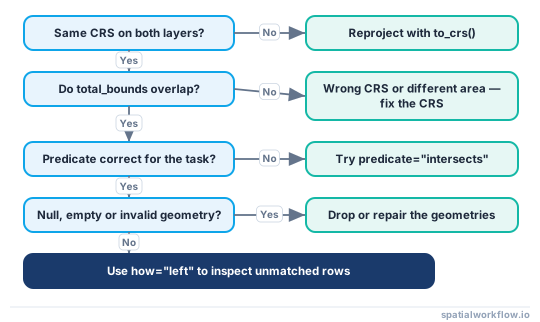
The problem is that sjoin() can run without an error and still return an empty GeoDataFrame, or return far fewer matches than expected. In practice, this usually happens for one of these reasons:
- the two layers use different CRS
- the datasets do not actually overlap
- the spatial predicate is wrong for the task
- some geometries are null, empty, or invalid
- the join direction or join type hides the missing matches
This guide shows how to diagnose each cause and apply the right fix.
Quick answer
If geopandas.sjoin() returns no matches:
- check that both GeoDataFrames have the same CRS with
.crs - reproject with
.to_crs(), not.set_crs() - compare
.total_boundsto confirm the layers overlap - test a different predicate such as
intersects - inspect null, empty, and invalid geometries before joining
In many cases, the fix is simply reprojecting one layer correctly and rerunning the join.
Diagnosis at a glance
Step-by-step solution
Check whether both GeoDataFrames use the same CRS
A CRS mismatch is one of the most common reasons a spatial join returns no rows.
Compare gdf.crs values before running sjoin
import geopandas as gpd

points = gpd.read_file("data/customer_locations.shp")
polygons = gpd.read_file("data/sales_territories.shp")

print("Points CRS:", points.crs)
print("Polygons CRS:", polygons.crs)
If one layer is in EPSG:4326 and the other is in EPSG:3857, the coordinates are not in the same system, so the geometries will not line up.
Reproject one layer with to_crs() instead of assigning CRS manually
Use to_crs() when the layer already has the correct CRS definition but needs to be converted.
if points.crs != polygons.crs:
    points = points.to_crs(polygons.crs)

joined = gpd.sjoin(points, polygons, how="inner", predicate="intersects")
print(joined.head())
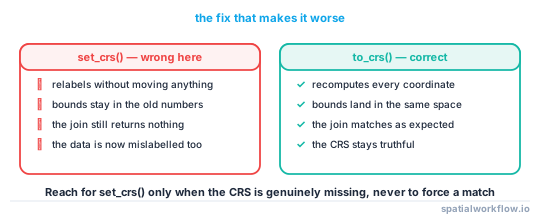
Common mistake: confusing set_crs() with to_crs()
set_crs() only labels the data. It does not transform coordinates.
Wrong approach:
points = points.set_crs(polygons.crs)Correct approach:
points = points.to_crs(polygons.crs)Use set_crs() only when the data has no CRS assigned and you know what the original CRS should be.
Confirm the layers actually overlap in space
Even if both layers have the same CRS, they may still be in different places.
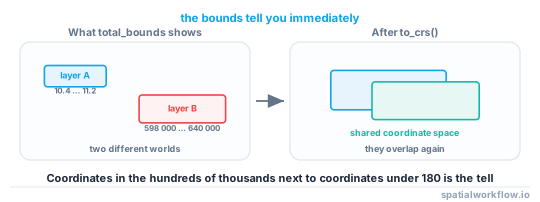
Inspect total_bounds for both layers
print("Points bounds:", points.total_bounds)
print("Polygons bounds:", polygons.total_bounds)
total_bounds returns:
[minx, miny, maxx, maxy]If one layer has bounds near [-74, 40, -73, 41] and the other has bounds near [500000, 4500000, 600000, 4600000], they are probably still in different coordinate systems or were imported incorrectly.
Plot both layers together to verify overlap
A visual check is often the fastest way to confirm whether a join should produce matches.
ax = polygons.plot(facecolor="none", edgecolor="black", figsize=(8, 8))
points.plot(ax=ax, color="red", markersize=10)
If the points are not visible or appear far away from the polygons, the join will return no matches.
Watch for wrong CRS metadata and bad source files
This often happens when one file is longitude/latitude and the other is projected in meters. It can also happen when a shapefile has a wrong .prj file or missing CRS metadata.
Use the correct spatial predicate
The predicate controls what counts as a match. If you choose the wrong one, the join can return zero rows even when the layers are close or overlapping.
Start with intersects when debugging
intersects is usually the safest first test because it matches geometries that overlap, cross, touch, or fall within one another.
joined = gpd.sjoin(points, polygons, how="inner", predicate="intersects")Be careful with within, contains, and direction
For a point-in-polygon join:
- points are usually
withinpolygons - polygons usually
containpoints
Direction matters. This can return no matches:
gpd.sjoin(points, polygons, how="inner", predicate="contains")That asks whether each point contains a polygon, which is false.
Test a few predicates quickly
for pred in ["intersects", "within", "contains", "touches"]:
    try:
        result = gpd.sjoin(points, polygons, how="inner", predicate=pred)
        print(pred, len(result))
    except Exception as e:
        print(pred, "not available:", e)
Check available predicates in your environment
Available predicates can vary by GeoPandas, Shapely, and the spatial index backend.
print(points.sindex.valid_query_predicates)If a predicate is unsupported in your environment, GeoPandas will usually raise an error. Check the available predicates before running the join.
Check for empty, null, or invalid geometries
Bad geometry can prevent expected matches.
Find null geometries with isna()
print("Null point geometries:", points.geometry.isna().sum())
print("Null polygon geometries:", polygons.geometry.isna().sum())
Find empty geometries with is_empty
print("Empty point geometries:", points.geometry.is_empty.sum())
print("Empty polygon geometries:", polygons.geometry.is_empty.sum())
Detect invalid geometries with is_valid
print("Invalid polygons:", (~polygons.geometry.is_valid).sum())Try repairing invalid polygons before joining
For some polygon issues, buffer(0) can repair self-intersections, but it is not guaranteed to fix every invalid geometry.
polygons = polygons.copy()
polygons["geometry"] = polygons.geometry.buffer(0)

print("Invalid polygons after repair:", (~polygons.geometry.is_valid).sum())
Then rerun the join:
joined = gpd.sjoin(points, polygons, how="inner", predicate="intersects")If buffer(0) changes geometry in a way you do not want, go back to the source data and fix it there.
Make sure the geometry types match the task
The geometry types in each layer affect which predicates make sense.
Point-in-polygon joins
If your goal is assigning points to polygons, the usual pattern is:
joined = gpd.sjoin(points, polygons, how="left", predicate="within")Polygon-to-polygon joins
For polygon overlays, intersects is often more useful than within or contains, especially when boundaries only partially overlap.
Line and polygon cases
If one layer contains lines and the other polygons, within may be too strict. If geometries only touch at boundaries, contains may return no matches while intersects or touches returns some.
Verify the join direction and join type
The join may not be empty. It may only be hiding unmatched rows.
Difference between left, right, and inner
inner: returns only matched rowsleft: keeps all rows from the left GeoDataFrameright: keeps all rows from the right GeoDataFrame
If you use inner, unmatched features disappear completely, which makes debugging harder.
Keep the layer you want to inspect on the left
Use the dataset you want to preserve as the left table.
joined = gpd.sjoin(points, polygons, how="left", predicate="within")Inspect unmatched rows after the join
unmatched = joined[joined["index_right"].isna()]
print(unmatched[["geometry"]].head())
print("Unmatched rows:", len(unmatched))
This is useful when every left-side feature failed to match and you need to inspect where they are.
Run a minimal test to isolate the issue
A small test can help confirm whether the problem is with the data or with your join logic.
Test with a small subset of rows
points_sample = points.iloc[:5].copy()
polygons_sample = polygons.iloc[:5].copy()

test_join = gpd.sjoin(points_sample, polygons_sample, how="inner", predicate="intersects")
print(test_join)
This only helps if the sample features are expected to overlap. A zero-row result from arbitrary first rows does not prove sjoin() is the problem.
Compare one geometry against another directly
pt = points.geometry.iloc[0]
poly = polygons.geometry.iloc[0]

print("Intersects:", pt.intersects(poly))
print("Within:", pt.within(poly))
print("Touches:", pt.touches(poly))
If direct geometry tests also return False, the problem is usually CRS, bad geometry, the wrong predicate, or no real overlap.
Code examples
Example: debug a point-to-polygon join
This is a practical sequence for checking a typical customer-points-to-territories workflow.
import geopandas as gpd

points = gpd.read_file("data/customer_locations.shp")
polygons = gpd.read_file("data/sales_territories.shp")

# 1. Check CRS
print(points.crs)
print(polygons.crs)

if points.crs != polygons.crs:
    points = points.to_crs(polygons.crs)

# 2. Check extents
print(points.total_bounds)
print(polygons.total_bounds)

# 3. Check geometry quality
print("Null points:", points.geometry.isna().sum())
print("Empty points:", points.geometry.is_empty.sum())
print("Invalid polygons:", (~polygons.geometry.is_valid).sum())

# 4. Run a safe first join
joined = gpd.sjoin(points, polygons, how="left", predicate="intersects")

# 5. Inspect unmatched rows
unmatched = joined[joined["index_right"].isna()]
print("Unmatched rows:", len(unmatched))
print(joined.head())
Explanation
A spatial join only returns matches when GeoPandas finds the expected spatial relationship between features in two layers. That depends on four things:
- both layers must use compatible coordinates
- the features must actually overlap or touch in space
- the predicate must match the relationship you want
- the geometries must be valid enough for spatial operations
If any one of these is wrong, sjoin() can run successfully and still return zero rows.
GeoPandas uses a spatial index to narrow down candidate matches and then applies a predicate such as intersects or within. If the extents do not overlap, the index finds no candidates. If the predicate is too strict, the candidates are rejected. If geometries are null, empty, or invalid, expected relationships may fail.
Edge cases and notes
- Layers that only touch at borders:
withinandcontainsmay return no matches, whileintersectsortouchesmay work. - Multipart geometries: MultiPolygons can behave differently than expected when testing containment near holes or gaps.
- Precision issues: Very small geometries or nearly coincident boundaries can produce unexpected results.
- Version differences: Predicate support can vary across GeoPandas and Shapely versions. Check
valid_query_predicates. - Missing or wrong CRS metadata:
to_crs()cannot fix incorrectly labeled source data until the original CRS is identified. - Sampling for tests:
head()oriloc[:5]is only useful if those features are expected to overlap.
Internal links
If you need the underlying concept, read How Spatial Join Works in GeoPandas.
For the standard workflow, see Perform a Spatial Join in GeoPandas and Reproject a GeoDataFrame in GeoPandas.
If the problem looks projection-related, use GeoPandas CRS Mismatch: How to Fix Projection Problems.
You may also need How to Fix CRS Mismatch in GeoPandas or GeoPandas Not Reading Shapefile: Common Causes and Fixes if the issue starts earlier in the workflow.
FAQ
Why does sjoin() return an empty GeoDataFrame without an error?
Because the function can run correctly even when no features satisfy the spatial relationship. The most common causes are CRS mismatch, no spatial overlap, the wrong predicate, or bad geometries.
Should I use set_crs() or to_crs() before a spatial join?
Use to_crs() to reproject data into the same coordinate system. Use set_crs() only when the layer is missing CRS metadata and you know the correct original CRS.
Which predicate should I use for point-in-polygon joins?
Start with within when points are the left layer and polygons are the right layer. If you are debugging, try intersects first because it is less restrictive.
How do I check whether two GeoDataFrames actually overlap?
Compare .total_bounds for both layers and plot them together on the same axis. If the extents do not overlap visually or numerically, the join will return no matches.
Can a missing spatial index cause sjoin() to return nothing?
No. GeoPandas builds the spatial index automatically, and a missing index would not silently drop matches. Empty results come from CRS mismatch, no real overlap, the wrong predicate, or invalid geometries, not from the index itself.
Why does sjoin_nearest() still return matches when sjoin() returns none?
sjoin_nearest() pairs each feature with the closest geometry regardless of overlap, so it almost always returns rows even when the layers do not intersect. If it matches but sjoin() does not, your features are near each other but not actually overlapping, which usually points to a CRS or predicate issue.
Could a predicate="op" argument be why my join fails?
The old op= keyword was removed; current GeoPandas uses predicate=. If you see an error or unexpected behavior from an op= argument, update the call to gpd.sjoin(points, polygons, predicate="intersects").
After fixing the CRS, why are only some features matching?
Partial matches usually mean the geometries genuinely overlap only in part, or some rows have null, empty, or invalid geometry that fails the predicate. Check the unmatched rows with a left join and inspect their geometry with is_empty and is_valid before assuming the join logic is wrong.