
How to Connect GeoPandas to PostGIS
Problem statement
A common GIS workflow is storing spatial data in PostGIS, then using Python to query, process, and write results back to the database. The practical problem is setting up a GeoPandas PostGIS connection that works reliably for both reading and writing spatial tables.
This page covers the Python side of that workflow: connecting to PostGIS, loading data into a GeoDataFrame, and saving results back to the database. It does not cover PostgreSQL administration, PostGIS installation, or general database theory.
Quick answer
The usual workflow to connect GeoPandas to PostGIS is:
- Create a PostgreSQL connection with SQLAlchemy
- Use
geopandas.read_postgis()to read spatial data into aGeoDataFrame - Use
GeoDataFrame.to_postgis()to write results back - Verify the geometry column name and CRS/SRID before reading or writing
import geopandas as gpd
from sqlalchemy import create_engine

engine = create_engine("postgresql+psycopg2://username:password@localhost:5432/gisdb")

sql = "SELECT id, name, geom FROM roads"
gdf = gpd.read_postgis(sql, engine, geom_col="geom")

gdf.to_postgis("roads_copy", engine, if_exists="replace", index=False)
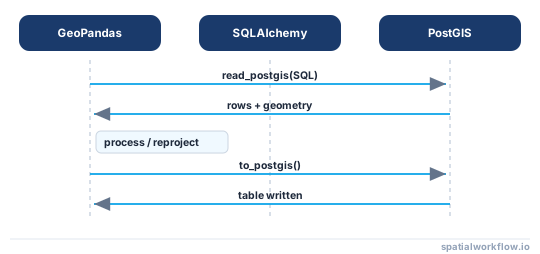
Read and write round trip
Step-by-step solution
What you need before connecting GeoPandas to PostGIS
Required Python libraries
You need:
geopandassqlalchemy- a PostgreSQL driver:
psycopg2orpsycopg
Install them with pip:
pip install geopandas sqlalchemy psycopg2-binaryIf you prefer the newer driver:
pip install geopandas sqlalchemy psycopgOn the database side, the PostgreSQL database must already have the PostGIS extension enabled.
Required database details
Before you connect, collect these values:
- host
- port
- database name
- username
- password
- target table name or SQL query
- geometry column name
- schema name if the table is not in
public
Typical example:
- host:
localhost - port:
5432 - database:
gisdb - user:
postgres - password:
your_password
Create a PostGIS database connection in Python
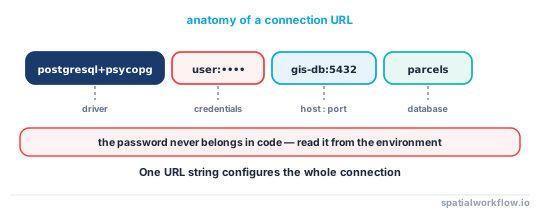
Build a SQLAlchemy connection string
For a standard Python PostGIS connection, use a PostgreSQL SQLAlchemy URL.
from sqlalchemy import create_engine

host = "localhost"
port = 5432
database = "gisdb"
user = "postgres"
password = "your_password"

connection_url = f"postgresql+psycopg2://{user}:{password}@{host}:{port}/{database}"
engine = create_engine(connection_url)
If you use psycopg instead of psycopg2, the URL becomes:
connection_url = f"postgresql+psycopg://{user}:{password}@{host}:{port}/{database}"
engine = create_engine(connection_url)
If your username or password contains special characters, URL-encode them before building the SQLAlchemy URL.
Do not hard-code real credentials in production scripts. Use environment variables or external configuration instead.
Create an engine and test the connection
Test the connection before trying to load spatial data.
from sqlalchemy import text

with engine.connect() as conn:
    result = conn.execute(text("SELECT version();"))
    print(result.scalar())
If this works, your credentials, host, and port are correct.
Read PostGIS data into a GeoDataFrame
Read records from a spatial table with SQL
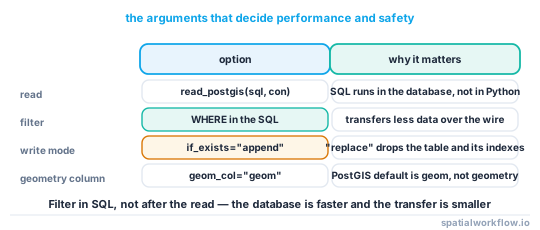
geopandas.read_postgis() reads the result of a SQL query. That query can return all rows from a table or only a filtered subset.
import geopandas as gpd

sql = "SELECT * FROM public.roads"
roads = gpd.read_postgis(sql, engine, geom_col="geom")
# If CRS is not detected correctly, pass it explicitly:
# roads = gpd.read_postgis(sql, engine, geom_col="geom", crs="EPSG:4326")

print(roads.head())
print(roads.crs)
This returns a GeoDataFrame where geom is treated as the active geometry column.
Load filtered records with a SQL query
In real workflows, it is usually better to filter in SQL instead of loading the whole table.
sql = """
SELECT road_id, road_name, road_type, geom
FROM public.roads
WHERE road_type = 'primary'
"""

primary_roads = gpd.read_postgis(sql, engine, geom_col="geom")
print(primary_roads.head())
Use a parameterized query
For reusable scripts, a parameterized query is a safer pattern than building SQL strings manually.
from sqlalchemy import text

sql = text("""
SELECT road_id, road_name, road_type, geom
FROM public.roads
WHERE road_type = :road_type
""")

primary_roads = gpd.read_postgis(
    sql,
    engine,
    geom_col="geom",
    params={"road_type": "primary"}
)
Set the geometry column and CRS correctly
If your geometry column is not named geom, pass the correct name.
sql = "SELECT id, name, shape FROM public.parcels"
parcels = gpd.read_postgis(sql, engine, geom_col="shape")
If CRS is missing or not detected as expected, inspect it:
print(parcels.crs)If the coordinates are already in a known CRS but the CRS metadata is missing, set it explicitly:
parcels = parcels.set_crs(epsg=4326, allow_override=True)# Use set_crs() only to assign missing/incorrect metadata.
# Use to_crs() when you need to transform coordinates to a different CRS.You can also pass the CRS directly when reading if the database SRID metadata is missing or not returned as expected:
parcels = gpd.read_postgis(
    sql,
    engine,
    geom_col="shape",
    crs="EPSG:4326"
)
Write a GeoDataFrame back to PostGIS
Save a new table to PostGIS
You can write a GeoDataFrame to PostGIS with to_postgis().
filtered = primary_roads.copy()
filtered["name_upper"] = filtered["road_name"].str.upper()

filtered.to_postgis(
    name="primary_roads_processed",
    con=engine,
    schema="public",
    if_exists="replace",
    index=False
)
This creates a new spatial table in PostGIS.
Replace or append to an existing table
The if_exists argument controls write behavior:
replace: drop and recreate the tableappend: add rows to the existing tablefail: raise an error if the table already exists
filtered.to_postgis(
    name="primary_roads_processed",
    con=engine,
    schema="public",
    if_exists="append",
    index=False
)
Use append only when the table schema, geometry type, and CRS match your GeoDataFrame.
Check that geometries were written correctly
After writing, verify the result by reading a sample back.
check_sql = """
SELECT road_id, road_name, geom
FROM public.primary_roads_processed
LIMIT 5
"""

check_gdf = gpd.read_postgis(check_sql, engine, geom_col="geom")
print(check_gdf.head())
print(check_gdf.crs)
Also check:
- geometry type consistency, such as
LINESTRINGvsMULTILINESTRING - expected SRID
- field names and data types
Handle CRS before writing
Before you save a GeoDataFrame to PostGIS, make sure the CRS is correct.
print(filtered.crs)

if filtered.crs is None:
    filtered = filtered.set_crs(epsg=4326)

# Example reprojection before writing
filtered_3857 = filtered.to_crs(epsg=3857)

filtered_3857.to_postgis(
    name="primary_roads_webmercator",
    con=engine,
    schema="public",
    if_exists="replace",
    index=False
)
Use set_crs() only when the coordinates already match that CRS and the metadata is missing. Use to_crs() when you need to transform coordinates into a different CRS.
Common issues when connecting GeoPandas to PostGIS
Connection errors
Common causes:
- wrong username or password
- wrong host or port
- database server not running
- firewall or blocked port
- incorrect database name
- special characters in credentials that were not URL-encoded
Always test with a simple SQL query first.
Geometry column not found
This usually happens when:
- your SQL query does not include the geometry column
- you passed the wrong
geom_colvalue - the geometry column has a different name, such as
shapeorwkb_geometry
CRS or SRID mismatches
Symptoms include data drawing in the wrong place or layers not aligning in QGIS.
Typical causes:
GeoDataFrameCRS is missing- table SRID does not match the actual coordinate values
- writing EPSG:4326 data into a table expected in EPSG:3857
If CRS is not detected correctly on read, pass crs= explicitly in read_postgis().
Table write failures
Common write problems:
- insufficient database permissions
- unsupported Python object types in columns
- invalid geometries
- mixed geometry types in one output table
You can check geometry validity before writing:
invalid = filtered[~filtered.geometry.is_valid]
print(len(invalid))
Notes for production and automation workflows
Keep credentials out of scripts
Do not store database passwords directly in production code. Use:
- environment variables
- config files outside version control
- secret managers
Use SQL filters to reduce data transfer
For large tables, filter in SQL first. This is faster than loading all records into Python and filtering afterward.
Validate geometries before writing
In batch workflows, check for:
- null geometries
- invalid geometries
- unexpected geometry types
- missing CRS
Explanation
GeoPandas does not manage the database connection by itself. The connection is handled by SQLAlchemy and a PostgreSQL driver such as psycopg2 or psycopg. Once the connection is available, GeoPandas can read query results into a GeoDataFrame with read_postgis() and write them back with to_postgis().
PostGIS stores geometry data in PostgreSQL tables with spatial metadata such as geometry type and SRID. When you read those records into GeoPandas, the geometry column becomes the active geometry in a GeoDataFrame, which you can then filter, reproject, validate, and export in Python.
Edge cases and notes
Non-default geometry column names
Not every PostGIS table uses geom. Some use geometry, shape, or wkb_geometry. Pass the actual name with geom_col=.
Working with schemas other than public
If your table is in another schema, include it in SQL and writes:
sql = "SELECT id, geom FROM staging.parcels"and:
gdf.to_postgis("parcels", engine, schema="staging", if_exists="replace", index=False)Large tables and performance limits
Very large spatial tables can be slow to load into memory. Use SQL filters, select only needed columns, and process smaller result sets when possible.
Mixed geometry types in one table
A single table containing both POINT and MULTIPOINT, or LINESTRING and POLYGON, can cause write or downstream GIS issues. Standardize geometry types before saving.
Internal links
If you need background first, read What Is PostGIS and How It Works With Python.
For a related file-based workflow, see How to Read a Shapefile in Python with GeoPandas.
If you need to change coordinate systems before saving data, see How to Reproject Spatial Data in Python (GeoPandas).
If your database connection fails, use How to Fix GeoPandas PostGIS Connection Errors.
FAQ
Do I need SQLAlchemy to connect GeoPandas to PostGIS?
In most practical workflows, yes. SQLAlchemy provides the database engine that GeoPandas uses for reading and writing.
Can GeoPandas read a custom SQL query instead of a full table?
Yes. geopandas.read_postgis() accepts a full SQL query, which is usually better than loading an entire table.
How do I specify the geometry column when reading from PostGIS?
Use the geom_col argument:
gdf = gpd.read_postgis(sql, engine, geom_col="shape")Can I append new records from a GeoDataFrame to an existing PostGIS table?
Yes. Use to_postgis(..., if_exists="append"), but make sure the schema, geometry type, and CRS match the target table.
Why does my PostGIS data load with the wrong CRS?
Usually because the table SRID is missing, incorrect, or does not match the actual coordinates. Check both the database SRID and gdf.crs before processing, and pass crs= explicitly to read_postgis() if needed.
How do I read only the rows within a bounding box from PostGIS?
Filter in SQL using a PostGIS spatial predicate such as ST_Intersects against an envelope, for example WHERE ST_Intersects(geom, ST_MakeEnvelope(xmin, ymin, xmax, ymax, 4326)). Doing the filter in the database transfers far less data than loading the full table and clipping in Python.
Can I write a GeoDataFrame to a specific SRID in PostGIS?
to_postgis() writes whatever CRS the GeoDataFrame already has, so set the CRS correctly with to_crs() before writing. The resulting table's SRID is derived from gdf.crs, so a layer in EPSG:4326 produces a table with SRID 4326.
Does to_postgis() create a spatial index automatically?
No. to_postgis() writes the geometry column but does not build a GiST index, so queries on large tables can be slow. Create one yourself afterward, for example CREATE INDEX ON roads_copy USING GIST (geom);.
How can I append rows to PostGIS without dropping the existing table?
Use to_postgis(..., if_exists="append"). This keeps the current table and adds your rows, but the geometry type, column schema, and CRS must match the target table or the write will fail or corrupt the layer.
Why does read_postgis() raise an error about no geometry column?
Either your SQL did not select the geometry column, or the geom_col name you passed does not exist. Confirm the column name in the database (it may be geometry, shape, or wkb_geometry) and include it in the SELECT list.