
How to Read a CSV with Coordinates as a GeoDataFrame
Problem statement
A CSV file with latitude and longitude columns is not spatial data by itself. It is just tabular data until you create a geometry column and assign a coordinate reference system (CRS).
A common GIS task is to take a CSV of site locations, inspection points, geocoded customer addresses, or sensor readings with coordinates, and turn it into a GeoDataFrame for mapping, spatial joins, distance analysis, or export.
Typical coordinate column patterns include:
latitudeandlongitudelatandlonxandy- projected coordinates such as
eastingandnorthing
The goal is to load the CSV, create point geometries from the coordinate columns, set the correct CRS, and return a valid GeoDataFrame.
Quick answer
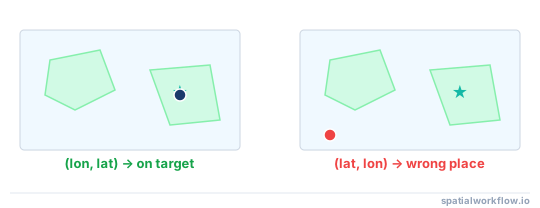
The shortest working way to read a CSV with coordinates into a GeoDataFrame is to read the CSV with pandas, create point geometry with GeoPandas, and assign the correct CRS.
import pandas as pd
import geopandas as gpd

df = pd.read_csv("points.csv")

gdf = gpd.GeoDataFrame(
    df,
    geometry=gpd.points_from_xy(df["longitude"], df["latitude"]),
    crs="EPSG:4326"
)

print(gdf.head())
print(gdf.crs)
Key requirements:
- identify the correct coordinate columns
- use
longitudeasxandlatitudeasy - assign the correct CRS
For most CSV files where longitude and latitude are stored in decimal degrees in WGS84, EPSG:4326 is the correct CRS.
From CSV to spatial

Step-by-step solution
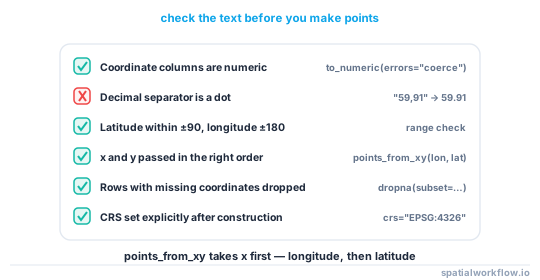
Step 1: Read the CSV into a pandas DataFrame
Start by loading the CSV with pandas and checking the coordinate columns.
import pandas as pd

df = pd.read_csv("points.csv")

print(df.head())
print(df.columns)
Confirm that the expected coordinate columns are present before creating geometry.
You should also check for missing or invalid values:
print(df[["longitude", "latitude"]].isna().sum())If the coordinates are stored as text, convert them to numeric:
df["longitude"] = pd.to_numeric(df["longitude"], errors="coerce")
df["latitude"] = pd.to_numeric(df["latitude"], errors="coerce")
Then remove rows with missing coordinates:
df = df.dropna(subset=["longitude", "latitude"])Step 2: Create point geometry from coordinate columns
Use geopandas.points_from_xy() to build point geometries.
import geopandas as gpd

geometry = gpd.points_from_xy(df["longitude"], df["latitude"])
The order matters:
- longitude = x
- latitude = y
This is one of the most common mistakes when creating points from CSV coordinates.
Step 3: Convert the DataFrame to a GeoDataFrame
Wrap the DataFrame in gpd.GeoDataFrame() and pass the geometry.
gdf = gpd.GeoDataFrame(df, geometry=geometry)At this stage, you have a geometry column, but the data still needs a CRS to be spatially meaningful.
Step 4: Assign the correct CRS
If the CSV contains geographic coordinates in latitude and longitude, use EPSG:4326.
gdf = gdf.set_crs("EPSG:4326")If the CSV uses projected coordinates such as UTM easting/northing, assign the projected CRS instead. For example, UTM Zone 33N:
gdf = gdf.set_crs("EPSG:32633")Do not guess the CRS. If you assign the wrong one, your points will appear in the wrong place and later analysis will be wrong.
Step 5: Verify the result
Check the first rows, geometry type, CRS, and bounds.
print(gdf.head())
print(gdf.geom_type.unique())
print(gdf.crs)
print(gdf.total_bounds)
You can also make a quick plot:
gdf.plot()This is a simple way to confirm that the points were created correctly.
Code examples
Example 1: Read a latitude/longitude CSV into a GeoDataFrame
This is the standard case.
import pandas as pd
import geopandas as gpd

df = pd.read_csv("store_locations.csv")

df["longitude"] = pd.to_numeric(df["longitude"], errors="coerce")
df["latitude"] = pd.to_numeric(df["latitude"], errors="coerce")
df = df.dropna(subset=["longitude", "latitude"])

gdf = gpd.GeoDataFrame(
    df,
    geometry=gpd.points_from_xy(df["longitude"], df["latitude"]),
    crs="EPSG:4326"
)

print(gdf.head())
print(gdf.crs)
This creates point geometry from longitude and latitude and assigns WGS84.
Example 2: Read a CSV with custom x/y column names
Not every file uses standard names. This example uses x_coord and y_coord.
import pandas as pd
import geopandas as gpd

df = pd.read_csv("survey_points.csv")

df["x_coord"] = pd.to_numeric(df["x_coord"], errors="coerce")
df["y_coord"] = pd.to_numeric(df["y_coord"], errors="coerce")
df = df.dropna(subset=["x_coord", "y_coord"])

gdf = gpd.GeoDataFrame(
    df,
    geometry=gpd.points_from_xy(df["x_coord"], df["y_coord"]),
    crs="EPSG:4326"
)

print(gdf.head())
If these columns are longitude and latitude in decimal degrees, EPSG:4326 is appropriate. If they are projected coordinates, assign the projected CRS instead.
Example 3: Read a CSV with projected coordinates
This is common for engineering, utilities, or local government data. Do not treat projected x/y values as lat/lon.
import pandas as pd
import geopandas as gpd

df = pd.read_csv("assets_utm.csv")

gdf = gpd.GeoDataFrame(
    df,
    geometry=gpd.points_from_xy(df["easting"], df["northing"]),
    crs="EPSG:32632"
)

print(gdf.head())
print(gdf.crs)
This example uses UTM Zone 32N. Replace the CRS with the correct one for your data.
Example 4: Reproject the GeoDataFrame after loading
After loading the CSV, you may need another CRS for web maps or spatial analysis.
import pandas as pd
import geopandas as gpd

df = pd.read_csv("monitoring_sites.csv")

gdf = gpd.GeoDataFrame(
    df,
    geometry=gpd.points_from_xy(df["longitude"], df["latitude"]),
    crs="EPSG:4326"
)

gdf_web = gdf.to_crs("EPSG:3857")
gdf_utm = gdf.to_crs("EPSG:32618")

print(gdf_web.crs)
print(gdf_utm.crs)
Use .to_crs() only after the original CRS has been assigned correctly.
Explanation
A pandas DataFrame is not enough for GIS work because it has no spatial geometry and no CRS metadata. You can store coordinate columns in a DataFrame, but GeoPandas needs a geometry column to perform mapping and spatial operations.
A GeoDataFrame becomes spatial when it has:
- a
geometrycolumn containing Shapely geometries such asPoint - a CRS that describes what those coordinates mean
This is why converting a CSV with coordinates into a GeoDataFrame always has two main steps: make geometry, then assign CRS.
It is also important to distinguish between assigning a CRS and reprojecting:
- Assigning a CRS means telling GeoPandas what CRS the current coordinates already use
- Reprojecting means converting coordinates from one CRS to another with
.to_crs()
If your CSV already contains WGS84 longitude and latitude, assign EPSG:4326. If you need Web Mercator or UTM later, reproject after that.
Coordinate order is another frequent source of errors. For point creation:
- x = longitude
- y = latitude
If you reverse them, your points may end up in the wrong country or fail visual checks entirely.
Edge cases and notes
CSV has latitude and longitude stored as text
If coordinate fields contain spaces, commas, or mixed text, convert them first:
df["longitude"] = pd.to_numeric(df["longitude"], errors="coerce")
df["latitude"] = pd.to_numeric(df["latitude"], errors="coerce")
Rows that fail conversion become NaN.
CSV contains missing coordinate values
Drop rows with null coordinates before creating geometry:
df = df.dropna(subset=["longitude", "latitude"])Longitude and latitude are reversed
If points appear in the wrong place, check whether you passed latitude as x and longitude as y. For point creation in GeoPandas, the correct order is always x then y.
CSV uses a projected coordinate system
If your file contains easting/northing values, do not assign EPSG:4326. That CRS is for geographic longitude/latitude coordinates in degrees, not projected coordinates in meters.
CSV uses a different delimiter or encoding
Some GIS exports use semicolons or non-UTF-8 encodings:
df = pd.read_csv("points.csv", sep=";", encoding="latin1")This is common with CSV files exported from Excel or local GIS tools.
Internal links
If you need a refresher on CRS concepts, see What Is a Coordinate Reference System (CRS) in GeoPandas?.
For the next step after loading data, see How to Reproject Spatial Data in Python (GeoPandas).
To save your points for use in other tools, see How to Export GeoJSON in Python with GeoPandas.
If your points are not showing where you expect, check Why Are My Points Showing in the Wrong Location in GeoPandas?.
FAQ
How do I convert a CSV with latitude and longitude to a GeoDataFrame in Python?
Read the CSV with pandas.read_csv(), create point geometry with gpd.points_from_xy(), and wrap the result in gpd.GeoDataFrame() with the correct CRS.
What CRS should I use for a CSV with lat/lon columns?
In most cases, use EPSG:4326 if the coordinates are longitude and latitude in decimal degrees in WGS84.
What is the difference between assigning a CRS and reprojecting a GeoDataFrame?
Assigning a CRS tells GeoPandas what CRS the existing coordinates already use. Reprojecting converts those coordinates into a different CRS using .to_crs().
Why are my CSV points appearing in the wrong place on the map?
The most common causes are:
- latitude and longitude columns were swapped
- the wrong CRS was assigned
- projected coordinates were incorrectly treated as WGS84
- coordinate values were malformed or read as text
How do I read a CSV with coordinates directly using gpd.read_file?
GeoPandas can read a CSV through GDAL's CSV driver, but you must supply the coordinate columns and CRS, for example gpd.read_file("points.csv", x_possible_names="longitude", y_possible_names="latitude") followed by set_crs("EPSG:4326"). The pandas plus points_from_xy approach is usually clearer and gives more control over cleaning.
What happens to rows with empty coordinate cells when building geometry?
points_from_xy produces an empty or invalid point for NaN values rather than raising an error, so those rows silently become unusable geometry. Drop them first with df.dropna(subset=["longitude", "latitude"]) so spatial operations and plots behave.
My CSV has a single column like "40.7,-74.0" — how do I split it into coordinates?
Split the combined column before creating geometry, for example df[["lat", "lon"]] = df["coords"].str.split(",", expand=True), then convert both to numeric with pd.to_numeric. After that, pass longitude as x and latitude as y to points_from_xy.
How do I save the resulting GeoDataFrame back out, for example to a GeoPackage?
Once you have a GeoDataFrame with geometry and a CRS, write it with to_file, for example gdf.to_file("points.gpkg", driver="GPKG"). For GeoJSON instead, reproject to EPSG:4326 first and use to_file(..., driver="GeoJSON").