How to Find the Nearest Point in GeoPandas
Problem statement
A common GIS task is finding the nearest feature from one point layer to another. For example:
- the nearest store to each customer
- the nearest bus stop to each address
- the nearest monitoring station to each sampling site
In GeoPandas, this usually means matching each point in one GeoDataFrame to the closest point in another GeoDataFrame.
This page focuses on point-to-point nearest matching in GeoPandas. If you need nearest line or polygon workflows, the same tool can still help, but the examples here are for point data.
Quick answer
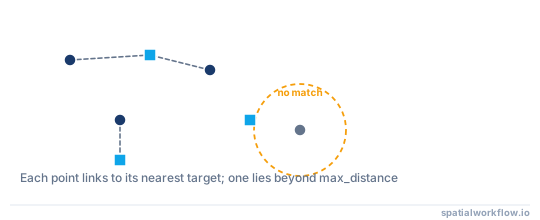
The most practical way to find the nearest point in GeoPandas is usually GeoDataFrame.sjoin_nearest().
Basic pattern:
import geopandas as gpd

customers = gpd.read_file("data/customers.shp")
stores = gpd.read_file("data/stores.shp")

customers = customers.to_crs("EPSG:32633")  # example projected CRS; use one appropriate for your area
stores = stores.to_crs(customers.crs)

nearest = customers.sjoin_nearest(
    stores,
    how="left",
    distance_col="distance_m"
)
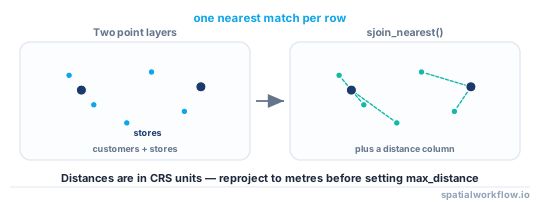
Use a projected CRS before measuring distance. If your data is still in latitude/longitude such as EPSG:4326, the distance values will not be reliable in meters.
Step-by-step solution
Load the point datasets
Start by reading the two point layers. In this example, one file contains customer locations and the other contains store locations.
import geopandas as gpd

customers = gpd.read_file("data/customers.shp")
stores = gpd.read_file("data/stores.shp")

print(customers.geometry.geom_type.unique())
print(stores.geometry.geom_type.unique())
Check that both layers contain point geometries. If not, nearest matching can still work, but the distance is then measured between other geometry types.
Check and align the coordinate reference system
Both layers must use the same CRS.
print(customers.crs)
print(stores.crs)
If the CRS differs, reproject one layer to match the other. For nearest-distance analysis, use a projected CRS with meter-based units if possible.
customers = customers.to_crs("EPSG:32633")  # example UTM zone
stores = stores.to_crs(customers.crs)
If your files start in EPSG:4326, reproject them before running nearest analysis. Geographic coordinates store degrees, not meters.
Find the nearest point with sjoin_nearest()
Use sjoin_nearest() to attach the nearest store to each customer.
nearest = customers.sjoin_nearest(
    stores,
    how="left",
    distance_col="distance_m"
)
This returns the nearest store match for each customer point, with attributes from the store added to the result. If multiple stores are tied at the same nearest distance, you may get multiple rows for one customer.
Useful parameters include:
how="left": keep all source features fromcustomersdistance_col="distance_m": store the nearest distance in a new columnmax_distance=5000: optional search threshold in CRS units
Example with a maximum search distance of 5 km:
nearest = customers.sjoin_nearest(
    stores,
    how="left",
    distance_col="distance_m",
    max_distance=5000
)
Review the output columns
Inspect the result:
print(nearest.columns)
print(nearest.head())
The result usually contains:
- original customer fields
- nearest store fields
index_rightfor the matched store row- the distance column if requested
For each customer, you get the attributes of the nearest store and the distance to it.
Filter by maximum search distance if needed
If you do not want unrealistic matches, you can filter after the join.
nearby_only = nearest[nearest["distance_m"] <= 5000].copy()If you used max_distance inside sjoin_nearest(), rows with no match inside that threshold will usually have missing joined values.
You can identify unmatched customers like this:
unmatched = nearest[nearest["index_right"].isna()].copy()Export the result
Save the result to a new GIS file for later use.
nearest.to_file(
    "output/customers_nearest_store.gpkg",
    layer="nearest_store",
    driver="GPKG"
)
You can also write GeoJSON:
nearest.to_file("output/customers_nearest_store.geojson", driver="GeoJSON")If you still need the output for distance analysis, keep it in the projected CRS.
Code examples
Example 1: Find the nearest store for each customer point
import geopandas as gpd

customers = gpd.read_file("data/customers.shp")
stores = gpd.read_file("data/stores.shp")

# Reproject both layers to a projected CRS with meter units
customers = customers.to_crs("EPSG:32633")
stores = stores.to_crs(customers.crs)

nearest = customers.sjoin_nearest(
    stores,
    how="left",
    distance_col="distance_m"
)

print(nearest[["customer_id", "store_id", "store_name", "distance_m"]].head())
Example 2: Limit results to nearby points only
import geopandas as gpd

customers = gpd.read_file("data/customers.shp").to_crs("EPSG:32633")
stores = gpd.read_file("data/stores.shp").to_crs("EPSG:32633")

nearest = customers.sjoin_nearest(
    stores,
    how="left",
    distance_col="distance_m"
)

# Keep only customers with a store within 5 km
within_5km = nearest[nearest["distance_m"] <= 5000].copy()

# Customers whose nearest store is farther than 5 km
outside_5km = nearest[nearest["distance_m"] > 5000].copy()

print(within_5km[["customer_id", "store_id", "distance_m"]].head())
If you want to prevent far matches during the join itself:
nearest_5km = customers.sjoin_nearest(
    stores,
    how="left",
    distance_col="distance_m",
    max_distance=5000
)
Example 3: Find the nearest point to one single geometry
For a single point, direct distance calculation is simple.
import geopandas as gpd

sites = gpd.read_file("data/sites.shp").to_crs("EPSG:32633")
stations = gpd.read_file("data/stations.shp").to_crs("EPSG:32633")

site = sites.iloc[0].geometry

stations = stations.copy()
stations["distance_m"] = stations.geometry.distance(site)

nearest_station = stations.loc[stations["distance_m"].idxmin()]

print(nearest_station[["station_id", "station_name", "distance_m"]])
This works well for one geometry or a small number of checks.
Explanation
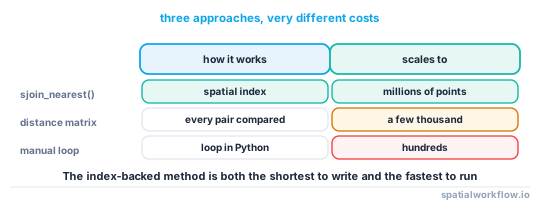
sjoin_nearest() is usually the best option when you need a nearest-neighbor workflow between two GeoPandas layers. It is more practical than looping through every feature and calculating distances manually.
There are three related but different ideas:
- Nearest join: match each feature to the closest geometry
- Standard spatial join: match features based on intersection, containment, or overlap
- Direct distance calculation: measure distance between known geometries without building a join
For example, sjoin() answers questions like "which customers fall inside this service area?"
sjoin_nearest() answers "which store is closest to each customer?"
Projected CRS matters because GeoPandas distance operations use the coordinate units of the layer. In EPSG:4326, those units are degrees. In a projected CRS such as UTM, they are usually meters, which makes the output usable for thresholds like 5000 meters.
For larger datasets, sjoin_nearest() is also faster and cleaner than Python loops.
Edge cases or notes
Points are in latitude and longitude
If your data is in EPSG:4326, distance values are in degrees, not meters. Reproject before running nearest analysis.
Multiple nearest points at the same distance
Ties can happen. In those cases, sjoin_nearest() may return multiple matches for one source feature. Check the output if you need exactly one match per point.
Non-point geometries
You can use nearest joins with other geometry types, but distance is then measured between the geometries themselves. This page is focused on point-to-point matching.
Missing or invalid geometries
Check for null or invalid geometry values before running the join.
customers = customers[customers.geometry.notna()].copy()
stores = stores[stores.geometry.notna()].copy()

customers = customers[customers.is_valid].copy()
stores = stores[stores.is_valid].copy()
Also make sure both layers actually have a defined CRS before reprojecting.
Internal links
If you are not sure which CRS to use, see the broader concept in How to Reproject Spatial Data in Python (GeoPandas).
Related tasks:
If your output distances look wrong, first check your reprojection workflow in How to Reproject Spatial Data in Python (GeoPandas).
FAQ
How do I find the nearest point in GeoPandas?
Use sjoin_nearest() to match each feature in one GeoDataFrame to the closest feature in another:
result = source.sjoin_nearest(target, how="left", distance_col="distance_m")Should I use sjoin_nearest() or calculate distance manually?
Use sjoin_nearest() for layer-to-layer matching. Use manual distance calculation when you only need the nearest geometry for one feature or a very small number of features.
Why are my nearest distance values incorrect?
The most common reason is CRS. If your data is in latitude/longitude, distances are calculated in degrees. Reproject to a local projected CRS before running the analysis.
Can I set a maximum distance for nearest matches?
Yes. Use max_distance in sjoin_nearest():
result = source.sjoin_nearest(
    target,
    max_distance=5000,
    distance_col="distance_m"
)
How do I keep the geometry of the matched nearest point, not just its attributes?
sjoin_nearest keeps the left geometry, so rename and carry the target geometry before the join, for example stores["store_geom"] = stores.geometry. That column survives the join and lets you draw connecting lines or measure later.
Why does sjoin_nearest return more rows than my source layer?
This happens when two or more target features are tied at the same nearest distance, producing duplicate rows for one source point. Drop the extras with nearest = nearest[~nearest.index.duplicated(keep="first")] if you need exactly one match per source feature.
How do I exclude a point from matching itself when both layers are the same?
Run the join, then filter out self-matches where the indices line up, for example by comparing an ID column and keeping rows where left_id != right_id. A plain sjoin_nearest of a layer against itself returns each point matched to itself at distance zero.
How do I find the k nearest points instead of just the single closest one?
sjoin_nearest accepts exclusive and a max_distance, but for k-nearest use scipy.spatial.cKDTree on the coordinate arrays from points_from_xy, querying with k=3. Build the tree in a projected CRS so the returned distances are in metres.