How to Extract Raster Values at Point Locations with Rasterio
Problem statement
A common GIS task is to extract a raster value for each point location. For example:
- get elevation values from a DEM at survey points
- extract land cover classes for monitoring sites
- read temperature values at station coordinates
- join raster cell values to point features for analysis or export
In Python, the standard way to do this with Rasterio is to sample the raster at point coordinates. The main requirement is that the point coordinates must be in the same CRS as the raster.
Quick answer
To extract raster values with Rasterio:
- open the raster with
rasterio.open() - make sure point coordinates are in the raster CRS
- pass point coordinates to
src.sample() - store the returned values in a list, table, or GeoDataFrame
Basic pattern:
import rasterio

points = [(500000, 4200000), (500100, 4200100)]

with rasterio.open("elevation.tif") as src:
    values = list(src.sample(points))

print(values)
For a single-band raster, each result contains one value. For a multi-band raster, each point returns one value per band.
Step-by-step solution
Check the raster and point data before sampling
Confirm the raster CRS
Before you sample, inspect the raster metadata. Point coordinates must match the raster CRS.
import rasterio

with rasterio.open("data/elevation.tif") as src:
    print("CRS:", src.crs)
    print("Band count:", src.count)
    print("Bounds:", src.bounds)
    print("NoData:", src.nodata)
If your raster is in a projected CRS such as UTM, do not sample it using longitude/latitude coordinates.
Confirm the point coordinate format
Point locations can come from:
- a Python list of
(x, y)tuples - a CSV with coordinate columns
- a GeoJSON file
- a shapefile or GeoPackage
Be clear about whether the coordinates are:
- longitude/latitude in EPSG:4326
- projected coordinates such as meters in UTM or Web Mercator
Decide what output you need
Typical outputs are:
- one value per point for a single-band raster
- one value per band for a multi-band raster
- a new attribute column in a GeoDataFrame
- a CSV for non-spatial reporting
Extract raster values from a list of coordinates with Rasterio
Open the raster file
This example shows a single-band GeoTIFF.
import rasterio

raster_path = "data/elevation.tif"

with rasterio.open(raster_path) as src:
    print(src.crs)
    print(src.count)
    print(src.nodata)
Build the coordinate list
Create a list of point coordinates in the raster CRS.
points = [
    (500000, 4200000),
    (500250, 4200250),
    (500500, 4200500),
]
Sample values with src.sample()
Use src.sample() to get the raster value at each point.
import rasterio

raster_path = "data/elevation.tif"
points = [
    (500000, 4200000),
    (500250, 4200250),
    (500500, 4200500),
]

with rasterio.open(raster_path) as src:
    samples = list(src.sample(points))

for point, value in zip(points, samples):
    print(f"Point {point} -> {value[0]}")
For a single-band raster, each sampled result is an array with one element, so value[0] gives the pixel value.
Extract raster values for point features in a GeoPandas GeoDataFrame
Read point data with GeoPandas
If your points are stored in GeoJSON or a shapefile, load them with GeoPandas.
import geopandas as gpd

points_gdf = gpd.read_file("data/sample_points.geojson")
print(points_gdf.crs)
print(points_gdf.head())
Reproject points to the raster CRS if needed
This is the most important step when point CRS and raster CRS differ.
import geopandas as gpd
import rasterio

points_gdf = gpd.read_file("data/sample_points.geojson")

with rasterio.open("data/elevation.tif") as src:
    raster_crs = src.crs

if points_gdf.crs != raster_crs:
    points_gdf = points_gdf.to_crs(raster_crs)
Filter to valid point geometries before sampling
Before extracting coordinates, remove null geometries and non-point features.
points_gdf = points_gdf[points_gdf.geometry.notnull()]
points_gdf = points_gdf[points_gdf.geometry.geom_type == "Point"]
Add sampled raster values as a new column
Extract the point coordinates from the geometry column, sample the raster, and store the result in a new attribute field.
import geopandas as gpd
import rasterio
import numpy as np

points_gdf = gpd.read_file("data/sample_points.geojson")
points_gdf = points_gdf[points_gdf.geometry.notnull()]
points_gdf = points_gdf[points_gdf.geometry.geom_type == "Point"]

with rasterio.open("data/elevation.tif") as src:
    if points_gdf.crs != src.crs:
        points_gdf = points_gdf.to_crs(src.crs)

    coords = [(geom.x, geom.y) for geom in points_gdf.geometry]
    sampled = list(src.sample(coords))

    values = []
    for item in sampled:
        val = item[0]
        if src.nodata is not None and val == src.nodata:
            values.append(np.nan)
        else:
            values.append(val)

points_gdf["raster_value"] = values

print(points_gdf.head())
This is the standard workflow for extracting raster cell values to point features.
Handle single-band and multi-band rasters
Single-band raster output
With one band, each sampled item contains one value.
single_band_values = [item[0] for item in sampled]This is the normal approach to read a raster value by coordinate in Python.
Multi-band raster output
For a multi-band raster, each point returns one value per band.
import geopandas as gpd
import rasterio

points_gdf = gpd.read_file("data/sample_points.geojson")
points_gdf = points_gdf[points_gdf.geometry.notnull()]
points_gdf = points_gdf[points_gdf.geometry.geom_type == "Point"]

with rasterio.open("data/multiband.tif") as src:
    if points_gdf.crs != src.crs:
        points_gdf = points_gdf.to_crs(src.crs)

    coords = [(geom.x, geom.y) for geom in points_gdf.geometry]
    sampled = list(src.sample(coords))

if sampled:
    for band_index in range(len(sampled[0])):
        points_gdf[f"band_{band_index + 1}"] = [row[band_index] for row in sampled]

print(points_gdf.head())
This is useful when sampling imagery or stacked environmental layers.
Save the results for later GIS use
Export points with new raster value fields
After sampling, save the updated GeoDataFrame.
points_gdf.to_file("output/points_with_values.gpkg", driver="GPKG")
points_gdf.to_file("output/points_with_values.geojson", driver="GeoJSON")
Export a non-spatial table
If you only need attributes, write a CSV.
points_gdf.drop(columns="geometry").to_csv("output/points_with_values.csv", index=False)Explanation
How Rasterio sampling works
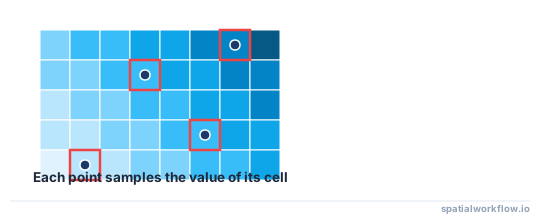
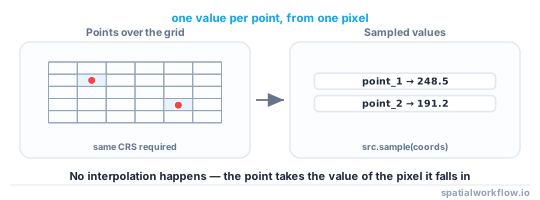
src.sample() takes an iterable of (x, y) coordinates and returns the value of the raster cell for each coordinate. It is a point sampling method, not a zonal statistic or neighborhood average.
If you need interpolation or summary values from surrounding cells, use a different workflow.
Why CRS mismatches cause wrong values
If your raster is in UTM and your points are in EPSG:4326, the coordinates refer to different places. Sampling will either return values from the wrong cells or values outside the intended area.
For more background, see How to Reproject Spatial Data in Python (GeoPandas).
When sampled values may be missing or wrong
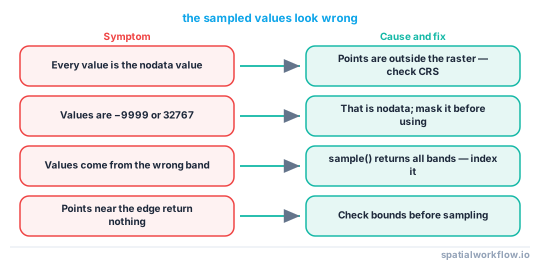
Unexpected values usually come from:
- points outside the raster extent
- cells marked as nodata
- wrong CRS
- null or non-point geometries in the input data
Edge cases / notes
Points outside the raster extent
If a point falls outside src.bounds, handle it explicitly before or after sampling. A bounds check is the safest option if you need reliable control over outside points.
import rasterio

points = [
    (500000, 4200000),
    (900000, 9999999),
]

with rasterio.open("data/elevation.tif") as src:
    valid_points = []
    for x, y in points:
        if src.bounds.left <= x <= src.bounds.right and src.bounds.bottom <= y <= src.bounds.top:
            valid_points.append((x, y))

    samples = list(src.sample(valid_points))
Outside points should be checked explicitly, because how they appear in output depends on your sampling and nodata handling.
Nodata values in the raster
If the raster uses a nodata value, convert it to None or NaN after sampling so your output is easier to analyze.
Invalid geometries
This workflow expects point geometries. If your dataset contains null geometries or non-point features, filter them before calling .x and .y.
points_gdf = points_gdf[points_gdf.geometry.notnull()]
points_gdf = points_gdf[points_gdf.geometry.geom_type == "Point"]
Sampling large point datasets
For large point files, avoid repeated raster opens inside loops. Open the raster once, build the coordinate list once, and sample in one pass.
Raster resolution and pixel alignment
The extracted value depends on raster cell size and grid alignment. Two nearby points can return different values if they fall in different cells.
Internal links
For CRS background and reprojection, see How to Reproject Spatial Data in Python (GeoPandas).
If your points come from a shapefile, read How to Read a Shapefile in Python with GeoPandas.
If you want to save the sampled points as GeoJSON, see How to Export GeoJSON in Python with GeoPandas.
If your sampled values look wrong, first check CRS, geometry type, nodata, and raster bounds.
FAQ
How do I extract raster values at point locations with Rasterio?
Open the raster with rasterio.open(), prepare point coordinates in the raster CRS, and pass them to src.sample(). For point files, read them with GeoPandas, reproject if needed, then add the sampled values as new columns.
Do the point coordinates need to match the raster CRS?
Yes. If the raster and points use different CRSs, reproject the points to the raster CRS before sampling.
How do I handle nodata values when sampling a raster?
Check src.nodata and replace matching sampled values with None or numpy.nan. That makes later filtering and statistics easier.
Can Rasterio extract values for multiple bands at the same point?
Yes. For a multi-band raster, each point returns one value per band. Store them in separate fields such as band_1, band_2, and band_3.
What happens if a point falls outside the raster extent?
Check outside points explicitly with src.bounds if you need predictable handling. That is safer than assuming how those locations will appear in sampled output.
How do I sample only one band from a multi-band raster?
Pass indexes= to sample(), for example src.sample(coords, indexes=1) for the first band. Each returned array then holds only that band's value, which avoids reading every band when you need just one.
Can I sample a raster directly from point coordinates without GeoPandas?
Yes. src.sample() accepts any iterable of (x, y) tuples, so a plain Python list or a NumPy array of coordinates works. GeoPandas is only a convenience for reading point files and handling their CRS.
How do I get the row and column of the cell a point falls in?
Use src.index(x, y), which returns the (row, col) of the cell containing that coordinate. This is useful when you want to read or modify the array directly rather than only sampling values.
Why are my sampled elevation values all the same number?
This usually means the points landed outside the raster extent or on nodata cells, so sample() returned the raster's fill or nodata value. Check each point against src.bounds and compare results to src.nodata before trusting them.
Is src.sample() slow for hundreds of thousands of points?
It reads each cell on demand, so very large point sets can be slow. Open the raster once, build the full coordinate list, and pass it to sample() in a single call rather than sampling inside a loop.