How to Create a Fishnet Grid in Python with GeoPandas
Problem statement
A common GIS task is to create a regular polygon grid over a study area. This is often called a fishnet grid. You might need it to split a large area into tiles, aggregate features by grid cell, create sampling units, or prepare polygons for spatial joins and indexing.
In Python, the usual goal is to generate a GeoDataFrame of square or rectangular polygons, optionally clip that grid to a boundary layer, and save the result as a Shapefile, GeoJSON, or GeoPackage.
The main challenges are:
- choosing the correct extent
- using a projected CRS so cell size is meaningful
- generating polygons efficiently
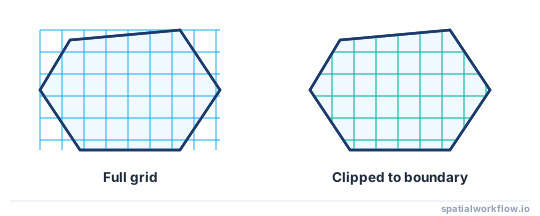
- deciding whether to keep full cells or clip them to the boundary
Quick answer
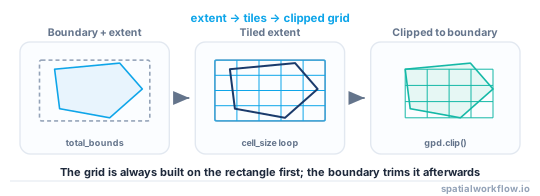
To create a fishnet grid in Python with GeoPandas:
- Read or define the extent to cover
- Make sure the data uses a projected CRS
- Choose a cell width and height in map units
- Loop over x and y coordinates to build grid polygons with Shapely
- Store them in a
GeoDataFrame - Optionally clip the grid to a study area boundary
- Export the output
Step-by-step solution
Read the boundary and get the extent
Your grid can come from:
- a manual bounding box
- the extent of a shapefile or GeoJSON
- the extent of a boundary polygon layer
Cell size should use projected units such as meters or feet. If your data is in latitude/longitude, the units are degrees, which usually makes fishnet cell sizes unsuitable for most GIS analysis.
import geopandas as gpd

boundary = gpd.read_file("data/study_area.shp")

if boundary.empty:
    raise ValueError("Boundary layer is empty.")

if boundary.crs is None:
    raise ValueError("Boundary layer has no CRS defined.")

minx, miny, maxx, maxy = boundary.total_bounds
print(minx, miny, maxx, maxy)
Reproject to a suitable projected CRS
Before generating a fishnet grid, check whether the layer uses a projected CRS. If not, reproject it first.
if not boundary.crs.is_projected:
    boundary = boundary.to_crs("EPSG:32633")  # example projected CRS
Use a projected CRS that fits your study area. The right CRS depends on location and analysis requirements.
print(boundary.crs)If the CRS is projected, your grid size will match those units. For example, in UTM, a cell size of 1000 means 1000 meters.
Set the fishnet cell size
For square cells, use the same value for width and height. For rectangular cells, use different values.
cell_width = 1000   # CRS units, often meters
cell_height = 1000  # CRS units, often meters

if cell_width <= 0 or cell_height <= 0:
    raise ValueError("cell_width and cell_height must be greater than 0.")
Calculate the number of rows and columns
Use the layer extent and math.ceil() so the grid fully covers the study area extent.
import math

minx, miny, maxx, maxy = boundary.total_bounds

n_cols = math.ceil((maxx - minx) / cell_width)
n_rows = math.ceil((maxy - miny) / cell_height)

print(f"Columns: {n_cols}, Rows: {n_rows}")
Build the grid polygons
Create each grid cell from its corner coordinates with shapely.geometry.box().
from shapely.geometry import box

grid_cells = []

for row in range(n_rows):
    for col in range(n_cols):
        x1 = minx + col * cell_width
        y1 = miny + row * cell_height
        x2 = x1 + cell_width
        y2 = y1 + cell_height

        grid_cells.append({
            "row": row,
            "col": col,
            "grid_id": f"r{row}_c{col}",
            "geometry": box(x1, y1, x2, y2)
        })
Convert the cells to a GeoDataFrame
grid = gpd.GeoDataFrame(grid_cells, crs=boundary.crs)
print(grid.head())
Code examples
Complete example: create and clip a fishnet grid
This example reads a boundary layer, reprojects it if needed, creates a fishnet grid, clips it to the study area, and saves the result.
import math
import geopandas as gpd
from shapely.geometry import box

# Read boundary layer
boundary = gpd.read_file("data/study_area.shp")

if boundary.empty:
    raise ValueError("Boundary layer is empty.")

if boundary.crs is None:
    raise ValueError("Boundary layer has no CRS defined.")

# Reproject if needed
if not boundary.crs.is_projected:
    boundary = boundary.to_crs("EPSG:32633")  # replace with a suitable projected CRS

# Clean geometry before clipping
boundary = boundary[boundary.geometry.notna()].copy()
boundary["geometry"] = boundary.geometry.buffer(0)

# Get extent
minx, miny, maxx, maxy = boundary.total_bounds

# Grid cell size in CRS units
cell_width = 1000
cell_height = 1000

if cell_width <= 0 or cell_height <= 0:
    raise ValueError("cell_width and cell_height must be greater than 0.")

# Calculate grid dimensions
n_cols = math.ceil((maxx - minx) / cell_width)
n_rows = math.ceil((maxy - miny) / cell_height)

# Build grid polygons
grid_cells = []
for row in range(n_rows):
    for col in range(n_cols):
        x1 = minx + col * cell_width
        y1 = miny + row * cell_height
        x2 = x1 + cell_width
        y2 = y1 + cell_height

        grid_cells.append({
            "row": row,
            "col": col,
            "grid_id": f"r{row}_c{col}",
            "geometry": box(x1, y1, x2, y2)
        })

grid = gpd.GeoDataFrame(grid_cells, crs=boundary.crs)

# Note: clipping may require a spatial index backend depending on your GeoPandas setup.
grid_clipped = gpd.clip(grid, boundary)

# Save output
grid_clipped.to_file("output/fishnet_grid.gpkg", layer="fishnet", driver="GPKG")
Keep full cells instead of clipping
If you are using the grid for indexing, tiling, or batch processing, keeping full cells is often better than clipping.
grid.to_file("output/full_grid.gpkg", layer="full_grid", driver="GPKG")Save as GeoPackage, Shapefile, or GeoJSON
GeoPackage is usually the best default because it supports long field names and stores CRS metadata cleanly.
grid.to_file("output/fishnet_grid.gpkg", layer="fishnet", driver="GPKG")
grid.to_file("output/fishnet_grid.shp")
grid.to_file("output/fishnet_grid.geojson", driver="GeoJSON")
Explanation
This GeoPandas fishnet grid workflow uses the input layer extent as the outer bounds of the grid. The code calculates how many rows and columns are needed from the extent width, extent height, and chosen cell size. math.ceil() makes sure the grid fully covers the extent even when the dimensions do not divide evenly.
Each cell is created as a polygon with box(x1, y1, x2, y2). Those polygons are stored with useful attributes such as row, column, and a grid ID, then converted into a GeoDataFrame.
Clipping is optional:
- use the full grid when you need regular tiles with consistent cell size
- clip the grid when you need the output to match the study area boundary
That distinction matters. A clipped grid can contain partial edge cells, which may not be appropriate if your later workflow depends on uniform cell area.
Edge cases or notes
Do not build analysis grids in geographic coordinates
Do not create a fishnet grid in a geographic CRS such as EPSG:4326 when your cell size is meant to represent meters or feet. A degree-based cell does not represent a constant ground distance across the map. Reproject first.
Extent not evenly divisible by cell size
If the extent width or height is not evenly divisible by the cell size, the last row or column will extend beyond the exact boundary extent. This is expected when using ceil(). If needed, clip the final grid to the boundary.
Very large grids can be slow
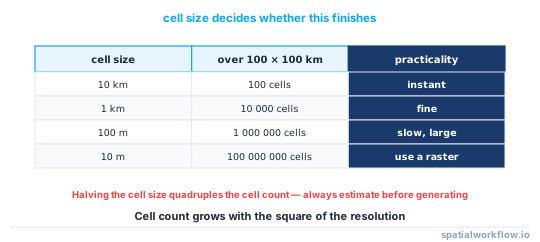
A fine grid over a large extent can create hundreds of thousands or millions of polygons. That can be slow to generate, slow to clip, and slow to export. Use larger cells, smaller extents, or split the workflow into sections if performance becomes a problem.
Invalid or missing boundary geometries
Before clipping, check for:
- empty layers
- missing geometry
- invalid polygons
- missing CRS
A common cleanup step is:
boundary = boundary[boundary.geometry.notna()].copy()
boundary["geometry"] = boundary.geometry.buffer(0)
buffer(0) can fix some invalid polygon issues, but it is not a universal repair method and may change geometry slightly.
Clipping may depend on your environment
In some GeoPandas setups, gpd.clip() may require a spatial index backend. If clipping fails in your environment, check your GeoPandas installation and optional spatial index dependencies.
Internal links
For CRS selection, see Projected vs Geographic CRS in GeoPandas.
If you need to load the input boundary first, see How to Read a Shapefile in Python with GeoPandas.
If you need to reproject the layer before creating the grid, see How to Reproject Spatial Data in Python (GeoPandas).
If you want to export the result as GeoJSON, see How to Export GeoJSON in Python with GeoPandas.
If your layers do not align correctly, see How to Fix CRS Mismatch Errors in GeoPandas.
FAQ
How do I create a fishnet grid from a shapefile extent in GeoPandas?
Read the shapefile with gpd.read_file(), get the extent with .total_bounds, then loop over that bounding box to create polygons with Shapely and store them in a GeoDataFrame.
Should I use EPSG:4326 or a projected CRS for a fishnet grid?
Use a projected CRS when cell size should represent meters or feet. EPSG:4326 uses degrees, which is usually not suitable for regular analysis grids.
How can I clip a fishnet grid to a polygon boundary?
Generate the full grid first, then use:
grid_clipped = gpd.clip(grid, boundary)This returns only the cell areas that fall inside the boundary geometry.
How do I add row and column IDs to each grid cell?
Add attributes when building each polygon:
{
    "row": row,
    "col": col,
    "grid_id": f"r{row}_c{col}",
    "geometry": box(x1, y1, x2, y2)
}
What happens if the extent does not divide evenly by the cell size?
The grid usually extends past the exact edge of the extent in the last row or column. This is normal when using math.ceil() to guarantee full coverage. If needed, clip the grid afterward.
How do I create a hexagonal grid instead of square cells?
shapely.geometry.box() only makes rectangles, so for hexagons you build each cell from its six corner coordinates and offset alternate rows by half a cell. Libraries such as h3 or a custom hexagon function are common alternatives when you need true hexagonal tiling.
How can I keep only grid cells that contain at least one feature?
After building the grid, run a spatial join against your features and keep the matched cells, for example cells_with_data = grid[grid.index.isin(gpd.sjoin(grid, points, predicate="intersects").index.unique())]. This drops empty cells without clipping cell shapes.
Is there a vectorized way to build the grid without a Python loop?
Yes. Generate the cell origins with numpy.meshgrid() over the x and y ranges, then pass the flattened arrays to a list comprehension or shapely.box to build all cells at once, which is much faster than nested loops for large grids. The result still goes into a GeoDataFrame with the layer's CRS.
How do I align the grid to round coordinates like multiples of 1000?
Snap the lower-left origin down to the nearest multiple before looping, for example minx = math.floor(minx / cell_width) * cell_width and the same for miny. This keeps cell edges on tidy coordinates so grids from different runs line up.
Why does my fishnet grid come out with no CRS or the wrong CRS?
The grid only inherits a CRS if you pass it when constructing the GeoDataFrame, as in gpd.GeoDataFrame(grid_cells, crs=boundary.crs). If you build cells from raw bounds without setting crs=, the result has crs=None and will not align with other layers until you call set_crs().