Vector vs Raster Data in Python GIS: Key Differences
Problem statement
A common Python GIS problem is deciding whether a dataset or workflow should use vector or raster data.
This matters because the data model affects:
- which Python library you should use
- which analysis methods make sense
- how fast the workflow runs
- how much detail or precision you keep
For example, parcel boundaries and road centerlines are usually handled as vector features, while satellite imagery, elevation models, and land cover grids are usually handled as rasters. If you use the wrong tool or the wrong data type, you can end up with slow processing, incorrect results, or unnecessary conversions.
This page explains the practical difference between vector and raster data in Python GIS so you can choose the right data type, library, and workflow for real GIS tasks.
Quick answer
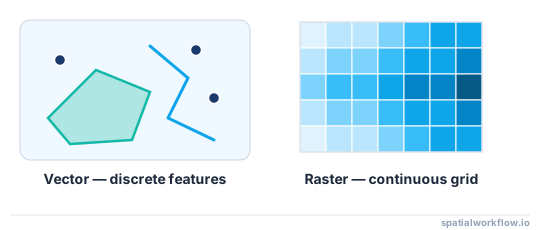
In Python GIS, the key difference is simple:
- Vector data stores discrete features as points, lines, and polygons
- Raster data stores values in a grid of cells or pixels
In Python GIS:
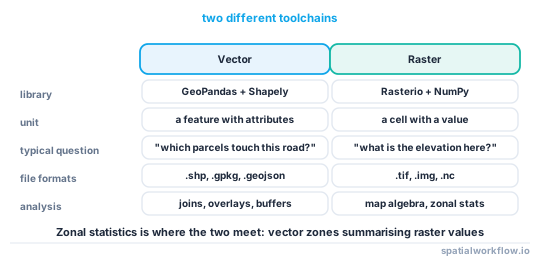
- vector workflows commonly use GeoPandas and Shapely
- raster workflows commonly use Rasterio
Use vector for boundaries, roads, parcels, and feature-based analysis.
Use raster for imagery, DEMs, temperature grids, land cover, and cell-based analysis.
Step-by-step solution
Identify whether your GIS problem is feature-based or grid-based
Start with the real problem, not the file format.
Use vector if your data represents discrete objects such as:
- parcel boundaries
- roads
- building footprints
- administrative areas
Use raster if your data represents a grid or surface such as:
- satellite imagery
- digital elevation models
- land cover rasters
- climate surfaces
If your task is “calculate parcel area” or “buffer roads,” it is usually a vector workflow.
If your task is “read elevation values” or “classify pixels,” it is usually a raster workflow.
Check how the data is stored
The file format often tells you which model you have.
Common vector formats:
- Shapefile (
.shp) - GeoJSON (
.geojson) - GeoPackage (
.gpkg)
Common raster formats:
- GeoTIFF (
.tif) - ASCII grid (
.asc) - JPEG2000 (
.jp2)
Still, verify the structure. A GeoTIFF is usually a raster, but you should inspect its metadata. A Shapefile is vector, but you should still check geometry types and CRS.
Match the data type to the Python library
Use the right library for the right data model.
- GeoPandas: read and analyze vector layers
- Shapely: geometry operations such as buffer, intersection, and area
- Rasterio: read raster datasets, metadata, and pixel values
In practice:
- GeoPandas works with rows of features and geometry objects
- Rasterio works with bands, arrays, transforms, and raster metadata
Choose the right analysis workflow
Typical vector workflows:
- spatial join
- buffering
- clipping
- dissolving
Typical raster workflows:
- band reading
- masking
- resampling
- raster calculation
The difference between vector and raster data is not just storage. It changes which operations are efficient and accurate.
Code examples
Example 1: Read a vector dataset with GeoPandas
This example reads a parcel layer and inspects its structure.
import geopandas as gpd

parcels = gpd.read_file("data/parcels.shp")

print(parcels.head())
print("Columns:", parcels.columns.tolist())
print("Geometry types:", parcels.geom_type.unique())
print("CRS:", parcels.crs)
print("Feature count:", len(parcels))
What this shows:
- each row is a feature
- geometry is stored in a geometry column
- attributes are stored like a table
You can also inspect polygon area after projecting to a suitable CRS:
import geopandas as gpd

parcels = gpd.read_file("data/parcels.shp")

# Use an appropriate projected CRS for your area, such as a local UTM zone
parcels_projected = parcels.to_crs("EPSG:32633")
parcels_projected["area_m2"] = parcels_projected.geometry.area

print(parcels_projected[["area_m2"]].head())
Example 2: Read a raster dataset with Rasterio
This example reads an elevation GeoTIFF.
import rasterio

with rasterio.open("data/dem.tif") as src:
    print("Width:", src.width)
    print("Height:", src.height)
    print("Band count:", src.count)
    print("CRS:", src.crs)
    print("Transform:", src.transform)

    band1 = src.read(1)
    print("Array shape:", band1.shape)
    print("Min value:", band1.min())
    print("Max value:", band1.max())
What this shows:
- raster data is stored as a grid
- the dataset has dimensions, bands, and an affine transform
- values are read as arrays of pixel values
Example 3: Compare what you can do with each type
A vector example: buffer roads and calculate polygon area.
import geopandas as gpd

roads = gpd.read_file("data/roads.geojson").to_crs("EPSG:32633")
roads["buffer_50m"] = roads.geometry.buffer(50)

buildings = gpd.read_file("data/buildings.geojson").to_crs("EPSG:32633")
buildings["area_m2"] = buildings.geometry.area

print(roads[["buffer_50m"]].head())
print(buildings[["area_m2"]].head())
A raster example: read elevation values and compute summary statistics.
import rasterio
import numpy as np

with rasterio.open("data/dem.tif") as src:
    dem = src.read(1, masked=True)
    print("Mean elevation:", float(dem.mean()))
    print("Min elevation:", float(dem.min()))
    print("Max elevation:", float(dem.max()))
This is the practical workflow difference:
- vector analysis works on features and geometry
- raster analysis works on cell values and arrays
Example 4: Convert between vector and raster in simple cases
Rasterize vector polygons into a grid:
import geopandas as gpd
import rasterio
from rasterio.features import rasterize

landuse = gpd.read_file("data/landuse.geojson").to_crs("EPSG:32633")

with rasterio.open("data/template.tif") as template:
    shapes = [(geom, value) for geom, value in zip(landuse.geometry, landuse["class_id"])]

    rasterized = rasterize(
        shapes=shapes,
        out_shape=(template.height, template.width),
        transform=template.transform,
        fill=0,
        dtype="uint8"
    )

print(rasterized.shape)
Polygonize raster classes into vector features:
import rasterio
from rasterio.features import shapes
from shapely.geometry import shape
import geopandas as gpd

with rasterio.open("data/landcover.tif") as src:
    data = src.read(1, masked=True)
    results = []

    for geom, value in shapes(data.filled(0), mask=~data.mask, transform=src.transform):
        results.append({"geometry": shape(geom), "class_id": int(value)})

    polygons = gpd.GeoDataFrame(results, crs=src.crs)

print(polygons.head())
Conversion is possible, but it changes structure and may reduce precision.
Explanation
What vector data represents
Vector data represents discrete real-world objects.
The main geometry types are:
- point: wells, trees, sample locations
- line: roads, rivers, pipelines
- polygon: parcels, lakes, city boundaries
Each feature can also have attributes such as parcel ID, road name, or land use type. This makes vector data useful for feature editing, table joins, and boundary-based analysis.
What raster data represents
Raster data represents a grid of cells. Each cell stores a value.
Examples:
- elevation value in a DEM
- reflectance in satellite imagery
- class code in land cover data
- temperature in a climate surface
Resolution matters. Smaller cells give more detail but increase file size and processing cost. This is why raster data is common for imagery and continuous surfaces.
Key differences that matter in Python GIS
The practical difference between vector and raster data includes:
- data structure: feature table vs pixel grid
- formats: Shapefile/GeoJSON/GeoPackage vs GeoTIFF/ASCII grid
- libraries: GeoPandas/Shapely vs Rasterio
- operations: overlay and buffer vs band math and resampling
- performance: large rasters can be heavy; complex vectors can also be slow
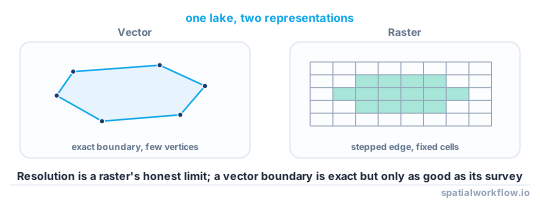
- precision: vectors preserve feature boundaries, while rasters depend on cell size
When vector is usually the better choice
Use vector when you need:
- boundaries and networks
- feature editing
- attribute-driven analysis
- small to medium feature collections
- exact geometry operations
When raster is usually the better choice
Use raster when you need:
- imagery and remote sensing
- elevation and terrain analysis
- continuous surfaces
- cell-based modeling
- classification outputs
If you need to choose quickly:
- use vector for objects
- use raster for surfaces and grids
Edge cases or notes
Some workflows use both vector and raster
Many real GIS tasks combine both.
Examples:
- clip a raster with polygon boundaries
- extract raster values at point locations
- summarize land cover cells inside administrative polygons
So vector and raster data are often used together in the same workflow.
Resolution and scale can change the best choice
A high-resolution raster can become very large. A vector layer with many detailed polygons can also become slow.
The best format depends on:
- task
- scale
- data volume
- required accuracy
Converting data types can lose information
Common pitfalls:
- rasterizing polygons can simplify edges
- polygonizing rasters can create many small noisy polygons
- repeated conversion can reduce quality
Convert only when the workflow requires it.
Polygonizing rasters can create very large outputs
Polygonizing a classified raster may produce thousands or millions of polygons, especially if the raster is noisy or high resolution.
In real projects, you often need to:
- exclude nodata and background cells
- filter small polygons after conversion
- simplify or dissolve output polygons
- polygonize only a clipped area instead of the full raster
CRS issues, invalid geometries, and common pitfalls
CRS matters for both vector and raster data.
Problems happen when:
- layers use different CRS values
- area or distance is calculated in a geographic CRS
- raster and vector layers do not align spatially
For vector data, invalid geometries can also break overlays, clipping, or buffering. Check geometry validity before running analysis:
import geopandas as gpd

parcels = gpd.read_file("data/parcels.shp")
invalid = parcels[~parcels.geometry.is_valid]
print("Invalid features:", len(invalid))
Other common pitfalls:
- using GeoPandas for raster files
- assuming file extension is enough without checking metadata
- comparing area or distance without reprojecting
- ignoring raster nodata values
Internal links
For a broader overview of where Python fits into GIS work, see Python for GIS: What It Is and When to Use It.
If you need related setup and vector workflow guidance, read GeoPandas Basics: Working with Spatial Data in Python and Coordinate Reference Systems (CRS) Explained for Python GIS.
If your layers do not line up during analysis, see How to Fix CRS Mismatch in Python GIS.
FAQ
What is the difference between vector and raster data in Python GIS?
Vector data stores features as points, lines, or polygons with attributes. Raster data stores values in a grid of cells. In Python GIS, vector workflows usually use GeoPandas and Shapely, while raster workflows usually use Rasterio.
When should I use vector data instead of raster data?
Use vector data for boundaries, roads, parcels, building footprints, and attribute-based analysis. It is usually the better choice when you are working with discrete features.
Which Python libraries are used for vector and raster GIS data?
For vector GIS, the main libraries are GeoPandas and Shapely. For raster GIS, the main library is Rasterio.
Can I convert raster data to vector data in Python?
Yes. You can polygonize raster classes into vector features, and you can rasterize vector features into a grid. But conversion can change precision, create extra noise, or simplify geometry.
Is GeoPandas used for raster data?
No. GeoPandas is for vector data. For raster data, use Rasterio.
How do I extract raster values at vector point locations in Python?
Read the point coordinates and sample the raster with Rasterio's sample() method:
coords = [(p.x, p.y) for p in points.geometry]
values = [v[0] for v in src.sample(coords)]
Make sure the points are in the same CRS as the raster before sampling, otherwise the coordinates will index the wrong cells.
How do I summarize raster values inside vector polygons (zonal statistics)?
Zonal statistics compute per-polygon summaries such as mean or sum of the cells that fall inside each polygon. The common Python tool is the rasterstats library (zonal_stats), which takes your vector polygons and the raster path and returns one statistic set per feature.
How do I clip a raster to a vector polygon boundary?
Use rasterio.mask.mask() with the polygon geometries, after reprojecting the vectors to the raster's CRS:
from rasterio.mask import mask
clipped, transform = mask(src, shapes, crop=True)
This keeps only the cells inside the boundary and updates the affine transform for the clipped extent.
Which is faster for large areas, vector or raster operations?
It depends on the task, not just the data type. Cell-based math over a continuous surface is usually fast and natural as a raster, while boundary and network operations are far more efficient as vector; forcing the wrong model, such as rasterizing detailed parcels or polygonizing a noisy image, is where performance and accuracy suffer.
Can a single GeoTIFF hold multiple bands, and how do I read them?
Yes. Multiband rasters such as RGB or multispectral imagery store each band separately, and src.count reports how many there are. Read one band with src.read(2) or all bands at once with src.read(), which returns an array shaped (bands, rows, cols).